Animate your designs in minutes
Intuitive Motion Design for iPad & Mac


Integraciones
Create powerful animations without the complexity
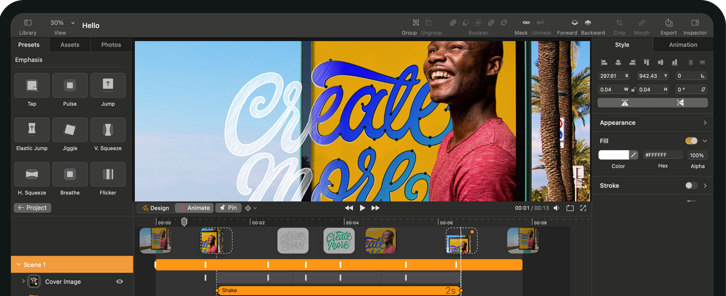
Simplified Animation UI
Intuitive & simpler UI for animation with no motion experience.
Versatile Media Support
Supports Audio, Video, SVG, and images.
Flexible Export Options
Export in MP4, MOV, GIF, and in any resolution.

Disponible en Apple
Seamless import of vector files from Figma, Adobe Illustrator, Sketch, and Linearity Curve.
Effortless Imports
Seamless import of vector files.
Flexible Integration
Use our plugin or just copy and paste.
Layer Preservation
Preserve layers and groups for easy animation.

Integraciones
Create powerful animations without the complexity
Automatic Keyframes
Keyframes are automatically recorded from movement.
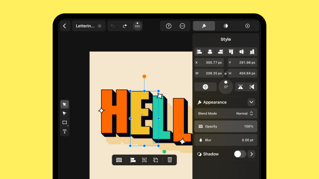
Professional Effects
Apply professional effects with just a few taps.
Use Templates
Leverage high-quality templates.
Integraciones
Organize, collaborate, and keep everyone aligned.
Shared Workspaces
Organize projects with folders and shared workspaces.
Invite Collaboration
Invite teammates to co-create or clients to review with ease.
Stay Synced
Keep everyone in sync with real-time updates.

See What You Can Create







It's Alive!
Motion graphics don't just look cool, they have huge ROI. With Linearity Move:
300%
More Animated Content Created
40
Hours of design time saved.
85%
Increase in content engagement
100%
More Fun

From our awesome users with love
Join our growing community of 10k+ who have converted to Linearity
The learning curve has been great. I started with limited animation experience and in a few hours was able to deliver multiple animated ad sets
Dawn
Snr Designer, SumUp
“With Linearity Move, I was able to animate my first illustration in less than 40 minutes, without checking any learning materials!
Kara Bernbeck
Designer & Artist
I was very happy not to have struggles with After Effects any more
Hara Nguyen
Designer
I love Linearity Move, it makes everything super easy and fast!
Julija Jelićanin
Eleven Space
I used their Figma plugin for a project. It works quite well and saves a lot of time just for importing and animating assets. The presets and timing curve are really helpful. It just saves time for simple animation.
bLuM3N
Designer
One of the best animation apps I’ve used.
Hyper_designs
Freelancer
I love Linearity Move, it makes everything super easy and fast!
Julija Jelićanin
Eleven Space
Why Designers & Animators Choose Linearity
Made for illustrators, designers and creative professionals.

Fast Animation
Keyframes are automatically recorded from movement.

Animate Anywhere, Anytime
Sync across Mac & iPad

No Animation Experience Needed
Copy and paste designs in, click and drag, use presets & templates.

Complete Control
Not a template tool. You have full editing & precision.
Everything you need to get started



Preguntas frecuentes
En este momento, Linearity Move admite la exportación de los vídeos creados a .mp4, pero pronto habrá disponibles más tipos de archivos de exportación. Puedes personalizar tu exportación .mp4 cambiando la resolución y la frecuencia de imagen sin que se resienta la calidad del vídeo.
Independientemente del estilo de animación digital, en Linearity Move, podrás importar una amplia gama de archivos diferentes, incluidos .curve, .vectornator, .sketch, .pdf y .ai. También puedes importar archivos Figma a Linearity Move accediendo a tu cuenta Figma a través de nuestra función Importación Figma (Figma Import) y seleccionando un archivo existente en tu espacio de trabajo Figma.
Por otro lado, en tu espacio de trabajo de Linearity Move verás tus archivos en alta resolución con la extensión .curve. Puedes abrir estos archivos en Move haciendo clic sobre ellos. Esto creará una copia del archivo con la extensión .move. El archivo original no se modificará en este programa de animación.
Puedes importar o copiar y pegar archivos .curve, .figma o .ai.
:quality(75))