
Vector Design That Feels Effortless
Create illustrations, logos, brand assets and more on Mac, iPad, and iPhone.
:quality(75))
Trusted and used by creatives at


Integraciones
Advanced vector tools that give you full control over your designs while keeping the process smooth and intuitive.
Smooth Interface
Fluid, intuitive, and distraction-free interface.
Advanced Control
Advanced vector tools with full control over nodes and layers.
Fast Performance
Lightning-fast performance for seamless design.

Disponible en Apple
From branding to social media, illustrations to print — Linearity Curve has everything you need to create high-quality vector graphic designs.
Auto Trace
Instantly convert images into editable vectors with Auto Trace.
AI Tools
Effortlessly remove backgrounds and refine images with AI-powered tools.
Perfect Typography
Achieve pixel-perfect typography with kerning, tracking, and custom fonts.
Integraciones
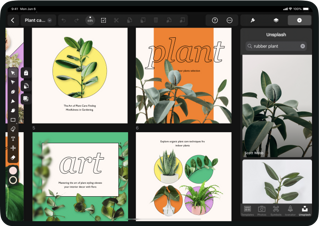
Stay in your creative flow on any Apple device, with seamless syncing and advanced Pencil support.
Seamless Syncing
Create and edit on Mac, iPad, and iPhone with seamless syncing.
Apple Pencil Optimized
Optimized for Apple Pencil, delivering a natural drawing experience.
Unlimited Ideas
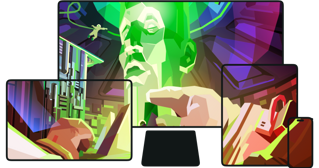
Unlimited artboards to keep all your ideas in one place.
Integraciones
Export Print Ready Designs
Versatile Formats
Import and export in all major formats: SVG, JPEG, PNG, AI, PDF, TIFF, and more.
Infinite Scaling
Scale your designs infinitely thanks to the power of vectors.
CMYK Ready
CMYK support for accurate print output.

Integraciones
Organize, collaborate, and keep everyone aligned.
Organized Workspaces
Organize projects with folders and shared workspaces.
Invite Collaboration
Invite teammates to co-create or clients to review with ease.
Stay Synced
Keep everyone in sync with real-time updates.


From our awesome users with love
Join our growing community of 10k+ who have converted to Linearity
Worth it! This app has brought so much ease to my designs. Its interface is fast to learn and the layout is familiar. I'd say this is the best app of its kind and a hugely positive add to my creative toolkit.
Lizzy Leroux
Creative Designer
Great app for vector design and editing. I stumbled across Linearity a few months ago, and it has helped me a lot in my amateur vector design and editing. It has a clear and intuitive interface, and the results are quite professional-looking. A great app!
PetrOmas
Amateur Graphic Designer
I was very new to vector based graphics and I have to say that the Linearity Curve app made the whole learning process so intuitive. Apart from a few essentials that I looked up I found myself creating graphics in no time as the functions are easy to find everything in logical places. I quickly gained confidence in designing.
Sebycello
Ease of use is out of this world
Great app for vector design and editing. I stumbled across Linearity a few months ago, and it has helped me a lot in my amateur vector design and editing. It has a clear and intuitive interface, and the results are quite professional-looking. A great app!
PetrOmas
Amateur Graphic Designer
I am just amazed that I can actually talk to people if I need, what would be impossible with adobe
Kathy
Freelancer
The Ultimate All in One, On-The-Go Design Tool Linearity Curve is seriously amazing. They give serious competition to Adobe, and I genuinely sometimes prefer Curve to Illustrator. The ease of navigation, the speed of the UI and the incredible support team make this an essential design tool in my arsenal. Versatile, easy to use and smooth as butter, I can’t recommend Curve enough.
RahulDesigns
Designer
I feel like this is a better option than buying a PS subscription. I’ve designed a lot since I got a membership and it’s actually been pretty easy to pick up. I’ve only been using it for a week.
Yasuke
You Got Me
Have been using this for over a year now, and it produces very accurate ai stuff and also gives me great wallpapers and logos. Designed many invitations and backgrounds for my work stuff on this!
Chetan
Love it
Powerful tool for Mac and iPad Serious alternative to Illustrator. It's simple and fluid to create and draw on both Mac and iPad, Pencil Pro is a plus. It is a powerful and comprehensive tool.
Jérôme
Powerful
I was very new to vector based graphics and I have to say that the Linearity Curve app made the whole learning process so intuitive. Apart from a few essentials that I looked up I found myself creating graphics in no time as the functions are easy to find everything in logical places. I quickly gained confidence in designing.
Sebycello
Ease of use is out of this world
Why Choose Linearity Curve
Made for illustrators, designers and creative professionals.

Complete creative control
Produce professional results with the precision & flexibility to edit, refine, and perfect every detail of your work.

Design Anything
Icons, Logos, PDFs, infographics, social media posts, illustrations, print material you can create anything you want with Linearity Curve!

Intuitive Apple Native Design
A fast, Intuitive and clean experience, that feels great to use. Whether on the Mac, iPad or iPhone.

Break free from the Desk
See What You Can Create







Preguntas frecuentes
Aunque se llama herramienta Pluma (Pen Tool), esta herramienta digital no se utiliza como un bolígrafo normal.
Antes se llamaba herramienta Bèzier, en honor a Pierre Bèzier, su inventor. También ha sido apodada como herramienta Trayectoria o Trazado (Path Tool), ya que se puede utilizar para dibujar una línea de trayectoria o trazado vectorial.
Hoy en día, la herramienta Pluma es quizás la herramienta digital más potente e importante para los/as diseñadores/as. La mayoría de los/as diseñadores/as gráficos/as, ilustradores/as y creativos/as la necesitan y utilizan todos los días, que es quizás la razón por la que lleva el nombre de un objeto tan común y útil.
En diseño gráfico, un trazado es una línea que aparece cuando se dibuja utilizando una herramienta vectorial como la Pluma , el Lápiz o la herramienta Pincel . Se compone de una serie de puntos de anclaje (o nodos).
Existen principalmente tres tipos de trazados:
- Trazado abierto. Un único trazado (o línea) con dos puntos de ancla finales.
- Trazado cerrado. Una forma cerrada que no tiene ningún punto final.
- Trazado compuesto. Dos o más trayectorias abiertas o cerradas conectadas entre sí.
Las herramientas Pluma en Adobe Photoshop, Adobe Illustrator y Linearity Curve te permiten dibujar trazados, pero hay algunas diferencias sutiles en cómo funcionan.
A diferencia de Adobe Illustrator y Linearity Curve, Photoshop es un software de edición de imágenes basado en píxeles. La pluma se puede utilizar para dibujar formas fijas basadas en píxeles, un trazado de Bézier o una forma basada en trazados de Bézier.
En Illustrator, la Herramienta Pluma se utiliza para dibujar trazados vectoriales que se pueden escalar a cualquier tamaño. Cualquier trazado también se puede editar después de dibujarlo para adoptar las cualidades de un trazo de pincel o efecto diferente.
La Herramienta Pluma de Vectornator también es basada en vectores y te permite crear trazados personalizados con curvas de Bézier. Al igual que en Illustrator, cualquier trazado que dibujes en Curve utilizando la Herramienta Pluma se puede editar. Sin embargo, diseñamos nuestra Herramienta Pluma para que se sienta más intuitiva, especialmente cuando se utiliza un iPad y un Apple Pencil. Descubre más sobre nuestra increíble Herramienta Pluma en nuestro Centro de Aprendizaje.
Los artistas vectoriales digitales pueden utilizar la herramienta Pluma, la herramienta Pincel, la herramienta Lápiz e incluso la herramienta Forma para dibujar. Existen muchas herramientas y técnicas potentes para dibujar digitalmente, pero trazar puntos con la herramienta Pluma es la manera más precisa de crear una línea exacta o un segmento de curva suave.
Quienes usen Linearity Curve en el ordenador de escritorio pueden utilizar el trackpad o el botón del ratón para hacer clic y añadir puntos de anclaje. Y si utilizas el iPad o una tableta de dibujo, solo tienes que pulsar con el lápiz para añadir puntos mientras dibujas. La dirección y el ángulo de la trayectoria o el trazado vienen determinados por la posición de los tiradores de los nodos.
Explore Linearity Curve
:quality(75))