
Vector Design That Feels Effortless
Create illustrations, logos, brand assets and more on Mac, iPad, and iPhone.
:quality(75))
Trusted and used by creatives at


Powerful Editing Made Easy
Advanced vector tools that give you full control over your designs while keeping the process smooth and intuitive.
Smooth Interface
Fluid, intuitive, and distraction-free interface.
Advanced Control
Advanced vector tools with full control over nodes and layers.
Fast Performance
Lightning-fast performance for seamless design.

One Design Tool for All Your Needs
From branding to social media, illustrations to print — Linearity Curve has everything you need to create high-quality vector graphic designs.
Auto Trace
Instantly convert images into editable vectors with Auto Trace.
AI Tools
Effortlessly remove backgrounds and refine images with AI-powered tools.
Perfect Typography
Achieve pixel-perfect typography with kerning, tracking, and custom fonts.
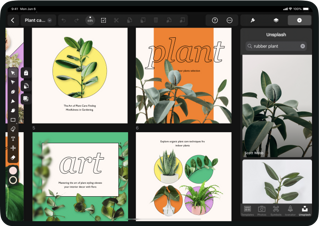
Design Anywhere & On the Go
Stay in your creative flow on any Apple device, with seamless syncing and advanced Pencil support.
Seamless Syncing
Create and edit on Mac, iPad, and iPhone with seamless syncing.
Apple Pencil Optimized
Optimized for Apple Pencil, delivering a natural drawing experience.
Unlimited Ideas
Unlimited artboards to keep all your ideas in one place.

Export Print Ready Designs
Export Print Ready Designs
Versatile Formats
Import and export in all major formats: SVG, JPEG, PNG, AI, PDF, TIFF, and more.
Infinite Scaling
Scale your designs infinitely thanks to the power of vectors.
CMYK Ready
CMYK support for accurate print output.

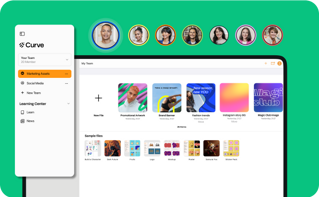
Collaborate with colleagues or clients
Organize, collaborate, and keep everyone aligned.
Organized Workspaces
Organize projects with folders and shared workspaces.
Invite Collaboration
Invite teammates to co-create or clients to review with ease.
Stay Synced
Keep everyone in sync with real-time updates.

From our awesome users with love
Join our growing community of 10k+ who have converted to Linearity
Worth it! This app has brought so much ease to my designs. Its interface is fast to learn and the layout is familiar. I'd say this is the best app of its kind and a hugely positive add to my creative toolkit.
Lizzy Leroux
Creative Designer
Great app for vector design and editing. I stumbled across Linearity a few months ago, and it has helped me a lot in my amateur vector design and editing. It has a clear and intuitive interface, and the results are quite professional-looking. A great app!
PetrOmas
Amateur Graphic Designer
I was very new to vector based graphics and I have to say that the Linearity Curve app made the whole learning process so intuitive. Apart from a few essentials that I looked up I found myself creating graphics in no time as the functions are easy to find everything in logical places. I quickly gained confidence in designing.
Sebycello
Ease of use is out of this world
Great app for vector design and editing. I stumbled across Linearity a few months ago, and it has helped me a lot in my amateur vector design and editing. It has a clear and intuitive interface, and the results are quite professional-looking. A great app!
PetrOmas
Amateur Graphic Designer
I am just amazed that I can actually talk to people if I need, what would be impossible with adobe
Kathy
Freelancer
The Ultimate All in One, On-The-Go Design Tool Linearity Curve is seriously amazing. They give serious competition to Adobe, and I genuinely sometimes prefer Curve to Illustrator. The ease of navigation, the speed of the UI and the incredible support team make this an essential design tool in my arsenal. Versatile, easy to use and smooth as butter, I can’t recommend Curve enough.
RahulDesigns
Designer
I feel like this is a better option than buying a PS subscription. I’ve designed a lot since I got a membership and it’s actually been pretty easy to pick up. I’ve only been using it for a week.
Yasuke
You Got Me
Have been using this for over a year now, and it produces very accurate ai stuff and also gives me great wallpapers and logos. Designed many invitations and backgrounds for my work stuff on this!
Chetan
Love it
Powerful tool for Mac and iPad Serious alternative to Illustrator. It's simple and fluid to create and draw on both Mac and iPad, Pencil Pro is a plus. It is a powerful and comprehensive tool.
Jérôme
Powerful
I was very new to vector based graphics and I have to say that the Linearity Curve app made the whole learning process so intuitive. Apart from a few essentials that I looked up I found myself creating graphics in no time as the functions are easy to find everything in logical places. I quickly gained confidence in designing.
Sebycello
Ease of use is out of this world
Why Choose Linearity Curve
Made for illustrators, designers and creative professionals.

Complete creative control
Produce professional results with the precision & flexibility to edit, refine, and perfect every detail of your work.

Design Anything
Icons, Logos, PDFs, infographics, social media posts, illustrations, print material you can create anything you want with Linearity Curve!

Intuitive Apple Native Design
A fast, Intuitive and clean experience, that feels great to use. Whether on the Mac, iPad or iPhone.

Break free from the Desk
See What You Can Create







常见问题
Photoshop和Adobe Illustrator中的钢笔工具与Curve的钢笔工具有什么区别?
Adobe Photoshop、Adobe Illustrator 和 Vectornator 中的钢笔工具都可以绘制路径,但工作方式上还是有一些细微的区别。
与Adobe Illustrator和Curve不同,Photoshop是一款基于像素图像编辑软件。 Photoshop的钢笔可用于绘制基于像素的固定形状、贝塞尔曲线路径或基于贝塞尔路径的形状。
在 Illustrator 中,钢笔工具用于绘制可以任意缩放矢量的路径。 所有的路径都可以在绘制后进行编辑,以呈现不同画笔笔触或效果。
Curve钢笔工具也是基于矢量的,您可以使用Bezier曲线创建自定义路径。 如同 Illustrator 一样,您可以在Curve中随后编辑钢笔工具绘制的路径。 不过,我们的钢笔工具效果更为直观,尤其是在使用 iPad 和 Apple Pencil 时。 千万我们的学习中心,详细了解神奇的 钢笔工具 。
Explore Linearity Curve
:quality(75))