Your files at your fingertips
Linearity securely stores all your files, syncing them across devices for easy access. Your existing documents will remain in their original locations until you manually migrate them. Once you do, you’ll unlock a whole host of new benefits.
Your files are safe. Migrate at your pace.
Access files online and offline across devices.
Team collaboration features coming soon.
Your files are safe
Rest assured, your existing files are safely stored in their original locations. However, any edits you make will create a duplicate in Linearity, where all changes are automatically saved.
- You’re still able to access all your files in their original locations.
- Migrate your files to benefit from better security and new features.
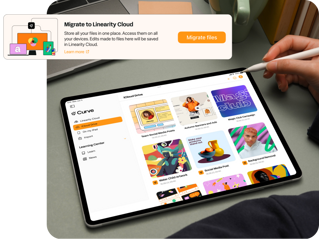
Migrating your files is easy



After upgrading your software, simply sign in to your Linearity account. If you don't already have one, just follow the prompts to create a new one.
Why use Linearity storage?
With a Linearity account, you can seamlessly store your files in one secure spot, access them from anywhere, and switch between devices effortlessly. Plus, by migrating to Linearity, you can conveniently free up valuable device and iCloud memory.
But that's not all; exciting team collaboration and file-sharing features are on the horizon, promising even more possibilities for your workflow in the near future.
Frequently Asked Questions
Después de actualizar tu software e iniciar sesión en tu cuenta, puedes optar por migrar todos tus archivos de una vez utilizando el botón "Migrar ahora".
Esta opción te permite migrar todos tus archivos de una vez de manera rápida.
Como alternativa, puedes migrar archivos uno por uno abriéndolos y editándolos. Cualquier cambio que realices se guardará automáticamente en Linearity Cloud. Además, cualquier documento nuevo creado se añadirá allí también. Una vez que todos tus archivos estén migrados, se te pedirá que los elimines de sus ubicaciones originales. Los espacios de almacenamiento en iCloud y local se eliminarán luego de la pantalla principal.
En Linearity Curve no hay opciones de hacer una copia de seguridad. Sin embargo, todos los archivos se guardan automáticamente en la aplicación y son accesibles en cualquier momento.
Tus archivos permanecen seguros en sus ubicaciones originales, ya sea en iCloud o en el almacenamiento de tu dispositivo. No eliminaremos ningún dato sin tu permiso. Sin embargo, si prefieres tener una copia de seguridad para mayor tranquilidad, puedes exportar todos tus archivos en formato .curve y guardarlos localmente. Cualquier nuevo documento que crees se guardará automáticamente en Linearity Cloud como un archivo .curve, y puedes exportarlo fácilmente y almacenarlo donde prefieras.
:quality(75))