Vector file formats explained: SVG, EPS, AI and PDF (when to use each in 2026)
Learn the differences between SVG, EPS, AI and PDF vector file formats. Understand when to use each and how to export correctly for web, print and design workflows.

Vector file formats like SVG, EPS, AI and PDF define how scalable graphics are stored, edited, and exported, each suited for different workflows such as web design, print production and professional editing.
Choosing the right file format shouldn’t feel like guesswork, but for many designers, it still does.
You export a logo. You send it to a developer. It breaks.
Or worse: you send a print file and it comes back with incorrect colors, missing fonts or rasterized elements.
The issue usually isn’t the design itself. It’s the file format.
Vector file formats sit quietly at the center of every design workflow. They determine whether your work is:
- scalable or fixed
- editable or locked
- optimized or bloated
- usable or broken
In 2026, when design flows across devices, platforms and teams, understanding formats isn’t optional anymore.
If you want the broader context of how formats connect to tools and workflows, explore our full vector design guide.
What are vector file formats
Vector file formats store graphics as mathematical instructions rather than pixels. That means instead of storing millions of colored squares, they store:
- coordinates
- curves
- shapes
- fill and stroke rules
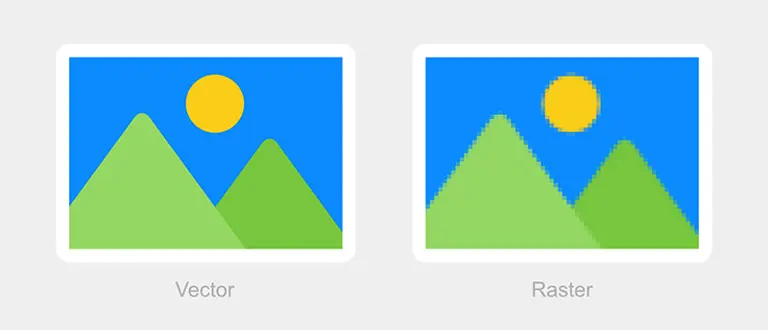
This approach is defined in standards maintained by organizations like the World Wide Web Consortium, which governs formats like SVG for the modern web.
Why this matters in real design work
This structure allows:
- infinite scaling without quality loss
- smaller file sizes (in many cases)
- easier editing at any stage
- consistent rendering across devices
Vector formats are especially efficient for interface elements because they separate structure from rendering.
Raster vs vector
| Typen | nHow it stores datan | Resultn |
|---|---|---|
| Vectorn | Math & pathsn | Scalable, editablen |
| Rastern | Pixelsn | Fixed resolutionn |
When people ask, “What’s the best vector format?” the honest answer is that there isn’t one single best format. There’s only the best format for what you’re trying to do next.
That’s what this article is really about.
Quick comparison: SVG vs EPS vs AI vs PDF
Before going deeper into each format, here’s the practical version:
| Formatn | Best forn | Main strengthn | Main limitationn |
|---|---|---|---|
| SVGn | Web, UI, icons, digital graphicsn | Lightweight, scalable, code-friendlyn | Not ideal for complex print workflowsn |
| EPSn | Legacy print workflowsn | Broad print compatibilityn | Outdated for many modern workflowsn |
| AI | Editable working filesn | Full editing controln | Tied closely to Illustratorn |
| PDFn | Sharing, review, print handoffnn | Widely supported and reliablen | Not always ideal as a master working filen |
That table is useful, but it only tells part of the story. What matters in practice is where it sits in the workflow.
SVG is usually an output format for the web. AI is usually a source file while you’re still designing. PDF is often the safest format for sending work to other people. EPS survives mainly because some printers, vendors, and older systems still expect it.
So instead of thinking about formats as competitors, it’s more useful to think of them as roles.
SVG: the format the web actually wants
SVG stands for Scalable Vector Graphics, and if there’s one vector format that feels most native to modern digital design, it’s this one.
SVG matters because it was built with the web in mind. Unlike a static image format, an SVG can scale perfectly across devices and densities. That’s why it’s such a natural fit for icons, logos, illustrations, charts, and other interface graphics.
SVG files are text-based, written in XML, which means they can be read, styled, and manipulated in ways traditional image formats can’t. Developers can change colors with CSS, animate shapes with JavaScript, and optimize the markup for performance. That makes SVG a bridge between design and code.
Still, SVG is not magic.
It works best when the graphic itself is structurally simple: logos, icons, flat illustrations, interface assets. As graphics become more complex, heavy gradients, photo-like detail, textured art, the benefits start to shrink. In those cases, the file can become bloated, harder to manage or simply less practical than a raster export.
So SVG is not “better than every format.” It’s better for a very specific kind of job: scalable digital graphics that need to work cleanly in web or product environments.
When SVG makes the most sense
- logos for websites and apps
- icon systems
- interface illustrations
- diagrams and charts
- assets developers may need to style or animate

If the design is going to live on the web and needs to stay sharp, lightweight and flexible, SVG is usually the right answer.
PNG still matters, but for different reasons
This article is about vector file formats, but PNG keeps showing up in the same conversations because it’s often the alternative people export instead of SVG.
PNG is not a vector format, it’s raster. But designers constantly move between vector source files and PNG exports, especially for social media, presentations, content graphics and compatibility-heavy use cases. So even if the design starts as vectors, the final output may still be PNG.
This is where a lot of confusion happens. Designers hear “export for web” and assume SVG is always correct. But that depends on where the image is going. A product interface or developer handoff might absolutely want SVG. A social post, an email banner or a platform that doesn’t support SVG properly may need PNG instead.
SVG vs. PNG: What’s the difference?
In this article, we’ll break down the differences between SVG and PNG, exploring when to use one over the other.

App of the Day
6.1K ratings
Get Started for free

Design in Curve.
Create sharp, scalable designs with intuitive tools for logos, illustrations, and professional branding.

Animate in Move.
Effortlessly create animations for social media, online ads, and motion graphics.
Trusted and used by leading brands


