Illustration Styles: A Complete Guide for Designers (2026)
This guide covers the major illustration styles used in modern design, what makes each one work and how to choose the right approach for your project.
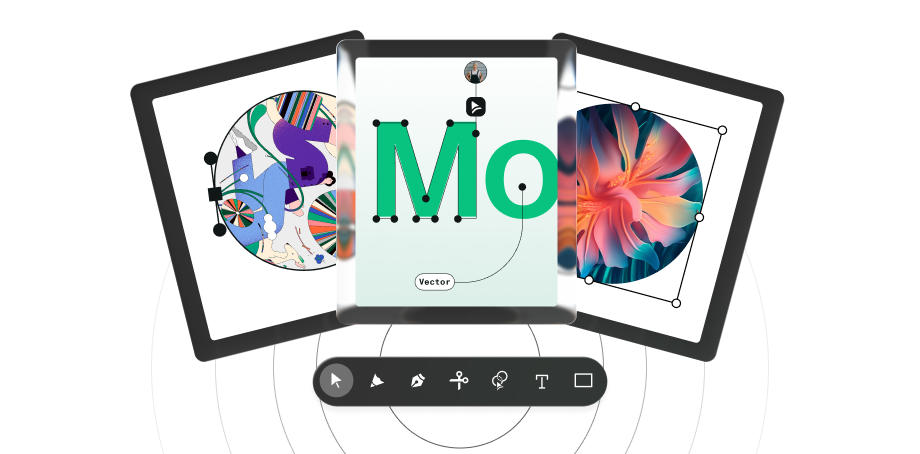
Illustration styles are distinct visual approaches, including flat, line art, isometric, character, editorial, and corporate, each suited to different design contexts, from product UI and branding to editorial publishing and technical diagrams. This guide covers the major styles used in modern design, the principles behind each, and a practical framework for choosing the right approach for your work.
An illustration style is a system of visual decisions: line quality, colour usage, proportions, perspective, and level of detail. Together, these elements create a consistent visual language. In modern design, illustration styles appear across branding, product interfaces, editorial content and motion. Choosing the right one is as much a strategic decision as a visual one.
What you'll learn in this guide:
- What are illustration styles and why they matter
- Drawing styles and visual expression
- Flat illustration
- Line art illustration
- Character design fundamentals
- Isometric illustration and 3D perspective
- Icon illustration
- Editorial illustration
- Corporate illustration style and branding
- Choosing the right illustration style
- Tools for modern illustration workflows
- Common mistakes in illustration styles
- The future of illustration styles
What are illustration styles and why they matter
Illustration styles are distinct visual approaches to drawing and design that define how shapes, colours, and characters are used to communicate ideas. They matter because they are never neutral. Every style choice communicates something before the content is even read.
A playful, expressive character illustration sets a completely different expectation than a structured isometric diagram. A loose editorial sketch signals something different from a flat icon set. The style is part of the message.
In modern design, illustration styles are used across:
- branding and marketing
- product interfaces and onboarding
- editorial and storytelling content
- motion and animation
Understanding the differences between styles, and what each one is suited for, is what allows designers to make deliberate choices rather than default ones.
Drawing styles and visual expression
Drawing styles are the foundation of illustration. They define how forms, lines, and textures are constructed, and ultimately shape how an idea is perceived.
The same concept can feel playful, technical, emotional, or minimal depending on how it's drawn. A loose sketch feels spontaneous and human. A clean geometric style communicates precision and control. Neither is better, they serve different purposes.
Common drawing styles include:
- Minimal line art — focused on clarity and reduction, stripping visuals to their essentials
- Sketch-based illustration — visible strokes and imperfections that feel expressive and human
- Geometric styles — built from simple shapes, prioritising structure and scalability
- Flat illustration — minimal shadows and gradients, optimised for digital interfaces
- Detailed or realistic rendering — depth, texture, and nuance for storytelling contexts
The tools you use shape how drawing styles are applied in practice. If you're working in vector, Linearity Curve vs Adobe Illustrator covers how different tools handle the same illustration workflow, which matters when choosing a style that needs to scale across formats.
In practice, drawing styles are rarely used in isolation. Designers often combine elements from different approaches while maintaining consistency across a project. Drawing style is also the starting point for everything else: it influences how characters are shaped, how environments are constructed, and how visual elements relate to each other.
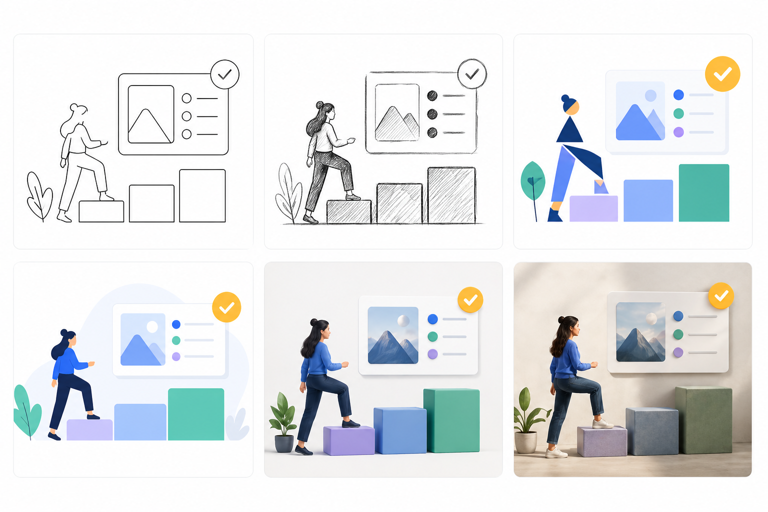
The same subject rendered in six different drawing styles — each communicates a different tone before a single word is read.
Go deeper: Drawing styles: a complete visual guide
Flat illustration
Flat illustration is one of the most widely used styles in digital design. It uses simple shapes, minimal detail, and limited colour palettes. No gradients, no shadows, no textures that add visual complexity without adding meaning.
The appeal of flat illustration is practical as much as aesthetic. Flat visuals are easy to scale across screen sizes, quick to produce consistently, and lightweight enough to perform well in web and app contexts. They also age well: the simplicity that makes them feel clean today tends to hold up better over time than styles that chase a more specific visual trend.
Flat illustration is particularly effective for:
- product UI and onboarding illustrations
- icon systems and spot illustrations
- marketing visuals that need to work at multiple sizes
- brand illustration systems that require consistent output from multiple designers
The main limitation of flat illustration is expressiveness. When a project calls for emotional depth, storytelling nuance, or strong personality, flat illustration can feel generic, especially when it follows common conventions too closely.
Flat illustration is also directly tied to how vector assets are structured and exported. The vector design guide covers file formats, scalability, and the technical side of keeping flat illustrations performant across platforms.

Flat illustration in a product onboarding context — simple shapes, limited palette, no unnecessary detail.
Go deeper: Flat illustration: style guide and techniques
Line art illustration
Line art is one of the oldest and most versatile illustration approaches. It builds images entirely from strokes. The lines carry everything: form, depth, texture, movement, and personality.
In digital work, line art is almost always produced as vector paths, which makes it infinitely scalable and easy to adapt across formats. A single line art illustration can work at icon size and poster size without any reworking.
Line weight is the primary expressive tool in line art. Heavier strokes read as closer or more prominent. Lighter strokes recede. A well-structured line art illustration typically uses two or three distinct weights, a heavy outer contour, a medium interior line, and a fine detail stroke, to create depth without any shading.
Line art works well across a wide range of contexts:
- editorial and publishing illustration
- branding and logo systems
- icon sets and UI illustration
- fashion and product illustration
- decorative and pattern work
The challenge is consistency. Because line art is unforgiving, every wobble and inconsistency is visible, it rewards clean vector construction and deliberate stroke control more than most other styles.
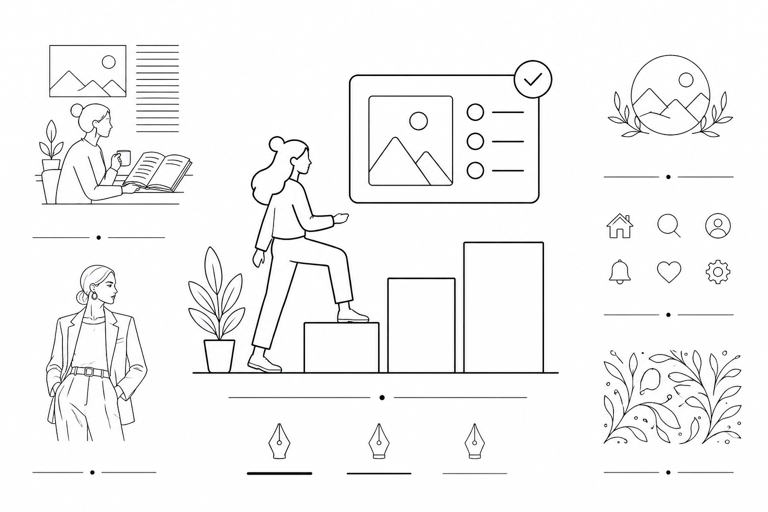
Line weight variation is the primary tool for creating depth in line art — no shading required.
Go deeper: Line art illustration: techniques and tools
Character design fundamentals
Character design is one of the most expressive areas of illustration. It combines storytelling, shape language, and personality into a single visual system. A well-designed character communicates emotion, intent, and identity instantly, often without any supporting text.
Whether it's a brand mascot, a UI illustration, or a narrative character, the goal is always the same: make the character recognisable, relatable, and consistent across contexts.
Strong character design relies on a set of core principles:
| Element | Silhouette |
|---|---|
| Purpose | Recognisable outline |
| Impact on perception | Instant identification — readable even without detail |
| Element | Proportions |
| Purpose | Defines physical structure |
| Impact on perception | Sets tone — exaggerated feels playful, realistic feels serious |
| Element | Shape language |
| Purpose | Curves vs sharp edges |
| Impact on perception | Communicates personality — rounded = friendly, angular = tense |
| Element | Colour palette |
| Purpose | Visual consistency and mood |
| Impact on perception | Reinforces brand and emotional tone |
| Element | Expression |
| Purpose | Facial and body language |
| Impact on perception | Adds relatability and storytelling depth |
| Element | Detail level |
| Purpose | Complexity of design |
| Impact on perception | Affects scalability and usability across contexts |
| Element | Purpose | Impact on perception |
|---|---|---|
| Silhouette | Recognisable outline | Instant identification — readable even without detail |
| Proportions | Defines physical structure | Sets tone — exaggerated feels playful, realistic feels serious |
| Shape language | Curves vs sharp edges | Communicates personality — rounded = friendly, angular = tense |
| Colour palette | Visual consistency and mood | Reinforces brand and emotional tone |
| Expression | Facial and body language | Adds relatability and storytelling depth |
| Detail level | Complexity of design | Affects scalability and usability across contexts |
Where character design is used
Character design appears across a wider range of contexts than most designers expect:
- Branding and mascots — a distinctive character becomes part of brand identity
- Product and UI illustration — onboarding flows, empty states, error and success states
- Games and animation — narrative characters built for motion and interaction
- Marketing and storytelling — characters that carry a campaign's emotional weight
Characters used in product onboarding and empty states are a form of UI animation when they move. If your illustration work extends into motion, the animation and motion design guide covers how static illustrations are brought to life, including Lottie, UI animation principles, and motion workflows.
In product design, characters are often used subtly. Friendly illustrations in onboarding flows or empty states reduce friction, create emotional connection, and make interactions feel more human. The character doesn't need to be complex, it just needs to feel consistent with the product's personality.
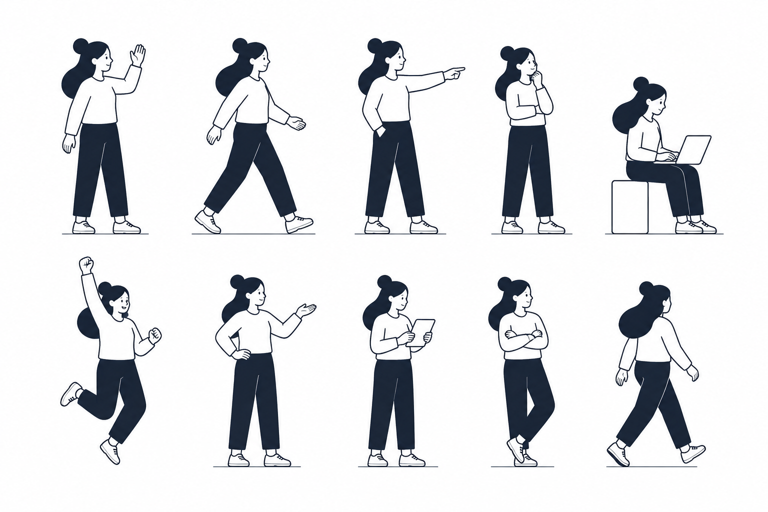
A well-designed character stays recognisable at any size — the silhouette test is a quick way to check.
Go deeper: Character design: principles, techniques, and practical guide
Isometric illustration and 3D perspective
Isometric illustration creates the illusion of three-dimensional space using a fixed-angle perspective where all axes remain parallel, preserving proportions regardless of distance. This gives it a specific advantage over perspective drawing: the clarity of 2D design combined with the depth of 3D visuals, without the complexity of true perspective rendering.
| Aspect | Depth |
|---|---|
| Isometric illustration | Simulated, uniform |
| Perspective illustration | Realistic, depth-based |
| Aspect | Vanishing point |
| Isometric illustration | None |
| Perspective illustration | One or more |
| Aspect | Scalability |
| Isometric illustration | High |
| Perspective illustration | Limited |
| Aspect | Consistency |
| Isometric illustration | Very high |
| Perspective illustration | Can vary with scene |
| Aspect | Use cases |
| Isometric illustration | UI, systems, diagrams |
| Perspective illustration | Art, storytelling, realism |
| Aspect | Isometric illustration | Perspective illustration |
|---|---|---|
| Depth | Simulated, uniform | Realistic, depth-based |
| Vanishing point | None | One or more |
| Scalability | High | Limited |
| Consistency | Very high | Can vary with scene |
| Use cases | UI, systems, diagrams | Art, storytelling, realism |
Why designers use isometric illustration
Isometric illustration simplifies complexity. It allows designers to represent systems, processes, and environments in a structured, readable way, which is why it's widely used in:
- product and SaaS visualisations
- technical diagrams and explainer graphics
- dashboards and infrastructure illustrations
- marketing visuals for tech products
At the core of isometric illustration is the grid, typically based on 30° angles, which ensures that every element aligns within the same spatial system. Once a base grid is defined, entire environments can be built from repeatable, modular components.
Common techniques include layering elements to create depth, using lighter and darker tones to separate planes, and adding subtle shadows and highlights for realism without breaking the geometric structure.

Isometric illustration maintains proportional consistency regardless of element placement — each component can be moved or reused without breaking the scene.
Go deeper: Isometric illustration: techniques and grid systems.
Also see: Isometric design: applying isometric principles to UI and product visuals
Icon illustration
Icon illustration is vector illustration optimised for clarity and scalability above all else. An icon must communicate one idea instantly at sizes from 16px to 512px without losing legibility at either extreme. The constraints of icon design make it one of the most technically demanding illustration disciplines.
The constraints of icon design make it one of the most demanding illustration disciplines. Every anchor point, every stroke width, every shape decision has a visible impact at small sizes. The margin for complexity is extremely low.
Strong icon illustration relies on:
- Optical consistency — icons in a set need to feel the same visual weight, even if their shapes are different
- Pixel alignment — at small sizes, paths that don't align to the pixel grid create blurry or uneven rendering
- Simplified shapes — the fewer paths, the cleaner the icon reads at small sizes
- Consistent stroke weight — mixing stroke widths across a set creates visual noise
Icon illustration sits at the intersection of illustration and system design. A single icon is a small design problem. An icon library of 200 icons is a systems problem, maintaining consistency across that many pieces, with multiple contributors, requires clear guidelines and reusable construction logic.

Icon sets need to hold together visually across very different subjects — optical consistency matters more than geometric precision.
Go deeper: Icon illustration: design principles and practical guide
Editorial illustration
Editorial illustration is driven by storytelling and interpretation rather than by branding or system requirements. Its purpose is to accompany and expand on a piece of writing, an article, essay, or news story, giving visual form to ideas that are abstract, complex, or emotionally charged.
Unlike product illustration, editorial illustration is rarely neutral. It takes a point of view. It can be provocative, humorous, melancholic, or surreal. That expressive range is exactly what makes it effective in publishing and journalism contexts.
Editorial illustration differs from other styles in a few important ways:
- Freedom of style — there's no single visual system to adhere to; each piece can take its own direction
- Concept-led — the idea comes before the execution; the illustration needs to land a specific point
- Context-dependent — the same concept might be illustrated very differently for a news article vs a literary magazine
- Often character-driven — human figures, expressions, and narrative scenes are common
The challenge for designers moving from product illustration to editorial work is learning to work without guardrails. There's no component library, no brand guide, no consistency requirement across pieces. The work lives or dies on whether the concept is clear and the execution is strong.

Editorial illustration communicates a specific idea or argument — the concept drives every visual decision.
Go deeper: Editorial illustration: styles, techniques, and how it works
Corporate illustration style and branding
Corporate illustration has become the dominant visual language for tech companies and startups. It solves a specific set of problems: communicating complex ideas simply, maintaining visual consistency across many outputs, and building a recognisable brand system that multiple designers can contribute to.
A well-built corporate illustration system is made up of a few consistent design decisions. Each one serves a specific function, together they create a visual language that holds together at scale:
| Element | Simplified shapes |
|---|---|
| Purpose | Reduce complexity |
| Impact on brand | Improves clarity and scalability |
| Element | Limited colours |
| Purpose | Maintain consistency |
| Impact on brand | Reinforces brand identity |
| Element | Consistent style |
| Purpose | Unified visual language |
| Impact on brand | Builds recognition and trust |
| Element | Friendly visuals |
| Purpose | Humanise the product |
| Impact on brand | Improves user engagement |
| Element | Modularity |
| Purpose | Reusable components |
| Impact on brand | Enables fast production and scaling |
| Element | Purpose | Impact on brand |
|---|---|---|
| Simplified shapes | Reduce complexity | Improves clarity and scalability |
| Limited colours | Maintain consistency | Reinforces brand identity |
| Consistent style | Unified visual language | Builds recognition and trust |
| Friendly visuals | Humanise the product | Improves user engagement |
| Modularity | Reusable components | Enables fast production and scaling |
Corporate illustration is a specific approach with specific trade-offs. Compared to more expressive or artistic styles, it prioritises system over individuality, which is the right call for most product and brand contexts, but not all:
| Aspect | Purpose |
|---|---|
| Corporate style | Clarity and consistency |
| Expressive / artistic style | Creativity and expression |
| Aspect | Flexibility |
| Corporate style | System-based |
| Expressive / artistic style | Open and varied |
| Aspect | Visual complexity |
| Corporate style | Low to medium |
| Expressive / artistic style | Medium to high |
| Aspect | Use case |
| Corporate style | Product, SaaS, branding |
| Expressive / artistic style | Editorial, art, storytelling |
| Aspect | Scalability |
| Corporate style | Very high |
| Expressive / artistic style | Depends on style |
| Aspect | Corporate style | Expressive / artistic style |
|---|---|---|
| Purpose | Clarity and consistency | Creativity and expression |
| Flexibility | System-based | Open and varied |
| Visual complexity | Low to medium | Medium to high |
| Use case | Product, SaaS, branding | Editorial, art, storytelling |
| Scalability | Very high | Depends on style |
Corporate illustration appears across product UI (empty states, onboarding, tooltips), marketing websites, blog content, and social campaigns. Because the style is modular, the same system works in small UI components and large-scale visuals.
The biggest advantage of a well-built corporate illustration system is scalability. Designers can create reusable character templates, modular scenes, and consistent iconography, turning illustration into a design system rather than a collection of standalone images.
A strong corporate illustration style should feel consistent across all touchpoints, simple enough to scale, and flexible enough to evolve with the brand. If every new illustration requires reinventing the style from scratch, the system isn't working.
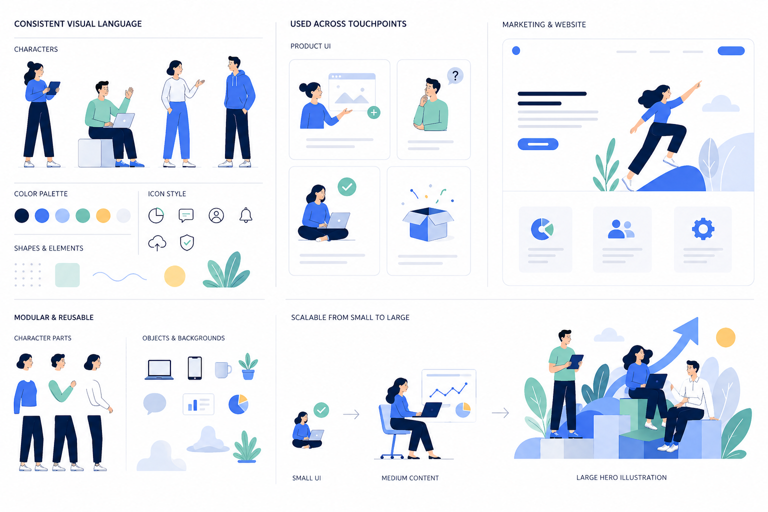
A modular illustration system treats characters and scenes as components — consistent individually, combinable in any configuration.
Go deeper: Corporate illustration: building scalable illustration systems
Choosing the right illustration style
Selecting an illustration style is not purely a visual decision, it's a strategic one. The style you choose directly affects how your message is understood, how your brand is perceived, and how effectively your visuals scale across different use cases.
Key factors to consider
Audience. Who are you designing for? A playful, character-driven style might resonate with a younger audience, while a more structured and minimal style may suit professional or technical users.
Product type. A SaaS dashboard, a mobile app, and an editorial article all require different levels of clarity, detail, and expression.
Brand identity. Your illustration style should reflect your brand's tone, whether it's friendly, serious, innovative, or expressive.
Technical constraints. Consider performance, scalability, and responsiveness. Complex illustrations may not work well across all devices or in all contexts.
Matching style to use case
| Use case | SaaS / product UI |
|---|---|
| Recommended style | Flat or corporate |
| Why | Clear, scalable, consistent across states |
| Use case | Onboarding and empty states |
| Recommended style | Character-based or flat |
| Why | Humanises the product, reduces friction |
| Use case | Technical diagrams |
| Recommended style | Isometric or geometric |
| Why | Structured and easy to understand |
| Use case | Editorial content |
| Recommended style | Expressive or sketch-based |
| Why | Engaging, storytelling-driven |
| Use case | Marketing campaigns |
| Recommended style | Hybrid or brand-driven |
| Why | Flexible and attention-grabbing |
| Use case | Branding and identity |
| Recommended style | Custom system |
| Why | Differentiation and recognition |
| Use case | Icon sets and UI actions |
| Recommended style | Icon illustration |
| Why | Optimised for clarity at small sizes |
| Use case | Long-form publishing |
| Recommended style | Editorial illustration |
| Why | Concept-led, context-specific |
| Use case | Recommended style | Why |
|---|---|---|
| SaaS / product UI | Flat or corporate | Clear, scalable, consistent across states |
| Onboarding and empty states | Character-based or flat | Humanises the product, reduces friction |
| Technical diagrams | Isometric or geometric | Structured and easy to understand |
| Editorial content | Expressive or sketch-based | Engaging, storytelling-driven |
| Marketing campaigns | Hybrid or brand-driven | Flexible and attention-grabbing |
| Branding and identity | Custom system | Differentiation and recognition |
| Icon sets and UI actions | Icon illustration | Optimised for clarity at small sizes |
| Long-form publishing | Editorial illustration | Concept-led, context-specific |
A practical framework for choosing
You can simplify the decision by asking four questions:
- What is the primary goal, clarity, emotion, or storytelling?
- Where will the illustrations be used (UI, marketing, editorial)?
- How scalable does the system need to be?
- How much flexibility does the brand require?
Real-world examples show that illustration style is not decorative, it's functional. Stripe uses clean, structured illustrations to communicate complex financial concepts clearly. Airbnb has developed a distinctive expressive style that reinforces brand personality. Google uses flexible illustration systems that adapt across products while maintaining coherence. Each choice is deliberate and aligned with how the brand needs to communicate.
Style decisions also connect to broader design principles, colour, hierarchy, composition, and visual consistency. The design principles guide covers the foundational layer that illustration style sits on top of.
There is no single best illustration style. The most effective one is always the one that aligns with your goals, your audience, and your product.
Tools for modern illustration workflows
Modern illustration workflows are no longer tied to a single tool. Designers move between environments depending on the task, sketching on an iPad, refining paths on desktop, collaborating in a shared file, exporting assets for production.
The most commonly used tools across professional illustration workflows:
Adobe Illustrator is the most feature-rich vector option. It handles complex multi-artboard projects, advanced path editing, and print production workflows. The trade-off is a steep learning curve and a subscription cost that may not suit every context.
Linearity Curve is built natively for Mac and iPad, with Apple Pencil support that makes it genuinely suited to illustration work. Its pen tool behaviour, Auto Trace, and clean SVG export make it a strong choice for vector illustration, particularly for designers who work across devices. For a direct comparison, see Linearity Curve vs Adobe Illustrator.
Figma is the standard for collaborative UI design. It's not a primary illustration tool, but for designers who need to integrate illustrations directly into product design files, it's where that work happens.
Procreate remains the strongest option for freehand drawing on iPad. It's raster-based, not vector, which means output doesn't scale infinitely. The most common workflow is sketching in Procreate and tracing or refining in a vector tool like Linearity Curve.
For teams producing illustration assets for social media, profile images, animated posts, platform-specific formats, the social media image sizes guide covers output specifications for every major platform.
Vector-based tools are essential for professional illustration because they allow visuals to scale without quality loss, adapt across screen sizes, and be reused and edited non-destructively. For anything going into a design system, a product UI, or a print workflow, vector is the default.

Linearity Curve on iPad is a vector illustration with full Apple Pencil pressure support and a clean, focused interface.
Related: Vector design: a complete guide to tools, formats and workflows
Common mistakes in illustration styles
The most common problems in illustration work are structural, not skill-based. Individual illustrations may look good on their own but fall apart when they need to work together as a system.
These problems tend to emerge organically in fast-moving teams. Without clear guidelines, different designers interpret a style differently over time. The fix is always the same: define the system before scaling production.
If your illustrations are hard to reuse, scale, or hand off to another designer, the issue is likely not execution, but structure. A good illustration style should behave like a design system, not a collection of individual artworks.
The future of illustration styles
Illustration is evolving quickly, driven by new tools, AI-assisted workflows, and the demands of cross-platform design systems.
AI is changing the early stages of the process. Tools can now generate shapes, compositions, and style variations at a speed that was impossible even two years ago. Tasks that used to take hours, rough composition, colour exploration, generating multiple style directions, can now happen in minutes.
| Aspect | Speed |
|---|---|
| Traditional workflow | Slower, manual |
| Modern workflow | Fast, AI-assisted |
| Aspect | Flexibility |
| Traditional workflow | Limited by time |
| Modern workflow | Highly adaptable |
| Aspect | Collaboration |
| Traditional workflow | Often individual |
| Modern workflow | Team-based, tool-integrated |
| Aspect | Scalability |
| Traditional workflow | Harder to maintain consistently |
| Modern workflow | Built into design systems from the start |
| Aspect | Traditional workflow | Modern workflow |
|---|---|---|
| Speed | Slower, manual | Fast, AI-assisted |
| Flexibility | Limited by time | Highly adaptable |
| Collaboration | Often individual | Team-based, tool-integrated |
| Scalability | Harder to maintain consistently | Built into design systems from the start |
But AI doesn't replace design thinking. It can generate starting points, surface variations, and speed up repetitive work. It doesn't decide what the illustration needs to communicate, ensure consistency across a system, or make the judgement calls that separate functional illustration from effective illustration.
The fundamentals remain unchanged: clarity, structure, and consistency. These are what make illustrations usable, scalable, and effective over time, regardless of which tools produced them.
The designers who understand those fundamentals will continue to have an advantage, because they'll know how to direct AI tools well and recognise when the output needs work.
Explore this topic in depth
This guide covers the full landscape of vector design. Each section connects to a dedicated deep-dive. Use this map to jump to the area most relevant to you, or read the full guide below.
| Topic | What it covers |
|---|---|
| What is vector art? | The difference between vector art and vector design, and why it matters |
| Bezier curves explained | How anchor points and handles control paths — the core skill in vector work |
| SVG vs PNG | When to use each format, with a focus on web and UI contexts |
| Vector file formats guide | SVG, AI, EPS, PDF — what each format does and when to reach for it |
| How to vectorize an image | Step-by-step process for converting raster images to clean vector paths |
| Best vector design software 2026 | A practical comparison of tools for every skill level and workflow |
| SVG editor online | How browser-based SVG tools work and when they make sense |
| Illustrator alternative: Linearity Curve vs Illustrator | A direct comparison for designers considering a switch |