Discord size guide 2026: make Discord icons, avatars, and banners

In 2026 Discord image sizes vary depending on the type of asset, but the most commonly recommended dimensions are 128 × 128 px for avatars, 512 × 512 px for server icons, 600 × 240 px for profile banners, and 1920 × 1080 px for server banners and invite backgrounds.
Discord's popular browser-based platform connects gamers and creatives worldwide through virtual chat.
Since launching in 2015, this recreational communication software has seen incredible growth. In January 2023, there were about 154 million monthly active users (MAU) on Discord.
Around 53% of Discord users are 25–34 years old, according to Statista.
Discord provides a niche platform for connecting with friends and family and also engaging large community groups. Whether you're personalizing your profile or spinning up your own Discord server, it's important to optimize your images.
It's also become an increasingly important platform for AI image generation using Midjourney. The Midjourney Server is the largest server on Discord, with over 16 million users.
This post is our pocket guide for you to create all your Discord visuals at the recommended sizes.
Why is Discord so popular?
Discord’s popularity comes from its community-first design. Instead of focusing on followers or feeds like traditional social media, Discord is built around servers - dedicated spaces where people gather around shared interests.
The platform has expanded far beyond gaming communities. Today, people use Discord to connect around topics like art, programming, AI, music, education, crypto, startups and online fandoms.
Several features helped drive its rapid growth:
- Free voice and video chat
- Custom communities (servers)
- Bots and automation tools
- Integration with platforms like Twitch, YouTube, and GitHub
- Large creator communities and AI tools
Discord has also become an important platform for AI tools and creative communities. For example, Midjourney runs primarily through Discord, and its server is one of the largest on the platform with millions of members.
Discord provides a niche platform for connecting with friends and family and also engaging large community groups. Whether you’re personalizing your profile or spinning up your own Discord server, it’s important to optimize your images.
This post is our pocket guide for creating all your Discord visuals at the recommended sizes.
Jumpstart your ideas with Linearity Curve
Take your designs to the next level.
Discord image size table
| Image type | Recommended size | File type |
|---|---|---|
| Avatar (profile picture) | 128 × 128 px (upload larger recommended) | JPEG, PNG, GIF |
| Personal profile banner | 600 x 240px | JPEG, PNG, GIF |
| Per-server profile banner | 680 × 240px | JPEG, PNG, GIF |
| Server icon | 512 x 512px | JPEG, PNG, GIF |
| Server banner background | 1920 x 1080px | JPEG, PNG, GIF |
| Server invite background | 1920 x 1080px | JPEG, PNG, GIF |
| Channel icon | 64 x 64px | JPEG, PNG, GIF |
| Emoji | 128 x 128px (max 256 KB)n | PNG, GIF |
| Sticker | 320 x 320px | PNG, APNG, Lottie |
| Role icon | 64 x 64px | JPEG, PNG, GIF |
| App cover | 800 x 450px | JPEG, PNG, GIF |
| App icon | 512 x 512px | JPEG, PNG, GIF |
| App banner | 1920 x 1080px | JPEG, PNG, GIF |
| Rich presence asset image (small) | 32 x 32px | PNG, GIF |
| Rich presence asset image (large) | 512 x 512px | PNG, GIF |
Per-server profile banners (Nitro only) are slightly wider than the global profile banner at 680×240px — design at this size and it works for both contexts with minor edge cropping on the global profile.
If you’re thinking about getting started on Discord, particularly starting your own community, you'll need some visual assets for an eye-catching Discord profile.
While video games remain the most popular topic for Discord communities, the applications are endless. You can join communities based around various topics: from art and music to novel writing, self-development, and more. As a Discord user, you can browse and choose your favorite Servers.
There's also a paid premium version of Discord called Discord Nitro, which offers boosters like custom animated emojis, animated Avatars, custom banners, and more.
Let's explore a few of the Discord features that require images. We'll provide some best practices for ensuring your profile and Servers look great and engage other users.
Ready to create brand assets that pack a punch?
Ready to create brand assets that pack a punch?
For image size specifications across every major platform — Instagram, YouTube, LinkedIn, TikTok, and more — the social media image sizes guide covers all platforms in one place.
Bots and servers on Discord
If you're totally new to the platform, you might be wondering what Bots and Servers are. Do they require you to upload an image?
A Discord Server is a community. Being a community-based platform, Discord is centered around specific interest groups. These might range from a three-person friend group to a community of thousands around a specific topic.
You can upload a Server icon and banner. You can also set a Server invite background to showcase your community to new users.
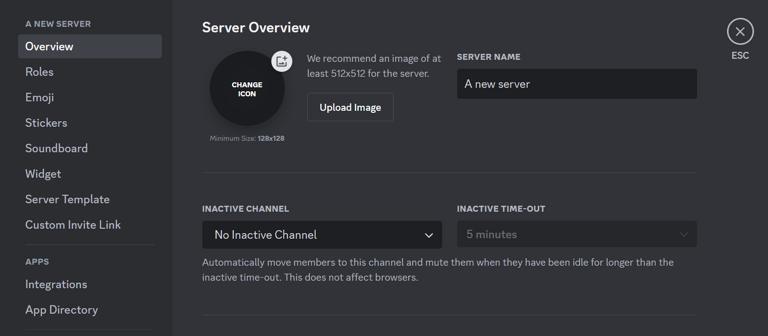
Image source: Discord
Each Discord server can have multiple channels dedicated to different topics within that server group.
A Discord Bot is AI software that improves the user experience on Discord by helping to perform tasks. You need to toggle Developer Mode on to create Bots.
You can use Bots for moderation, statistics, announcements, playing music, and even to help you find the right meme for a conversation. Discord Bots don't require you to upload an image.
Recommended Discord avatar size
- 128 × 128 px minimum
- 1:1 aspect ratio
You can upload larger images and Discord will automatically scale them.
File size limits
- Free accounts: up to 25 MB uploads
- Nitro users: up to 500 MB uploads
Animated avatars are available with Discord Nitro.
Learn more about the intersection between technical creativity, coding, and AI in generative design.
Discord Avatar size
Your Discord Avatar (profile picture) is how other Discord users will see and interact with you while using the platform. It represents you and should communicate something about who you are.
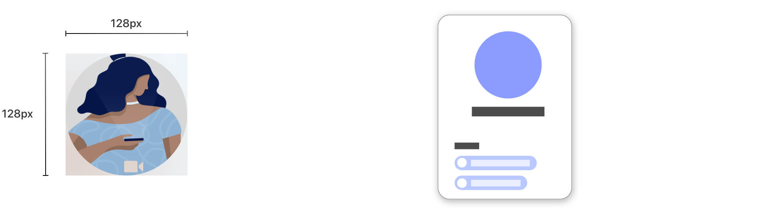
Discord Avatar size
While there's a general file size limit of 8MB on the free version of Discord, you can upload larger files when you upgrade to the Nitro premium package.
Want to design your Discord Avatar from scratch? Try one of our 3,000+ static and animated templates to kickstart your creativity:
Discord Server icon and banner background sizes
To start a Discord Server, you'll need an icon for your Server logo. Think of it as your Server's profile image or Avatar.
This circular icon will appear in your community members’ sidebar and wherever your server is displayed for other Discord users to see.
Discord server icon size
- 512 × 512 px
- 1:1 aspect ratio
The image is uploaded as a square but displayed as a circle, so keep important design elements centered.
When setting up your Server, you can also add a Discord banner background and Server invite background image. The banner and invite background images can only be customized if you boost your Server.
A Server Boost on Discord is a paid add-on that lets you enhance your server with benefits like improved audio quality, more emoji slots, better video quality, and custom Server banners.
Discord gives you plenty of screen real estate for these images, allowing you to customize your server.
The minimum size for your Discord Server's banner background is 960 x 540px, and Server invite background images must be at least 1920 x 1080px. As long as you keep a 16:9 ratio, we recommend image sizes of 1920 x 1080px and bigger.
Discord server banner
Servers that enable Server Boosts can add a custom banner.
Recommended size:
- 1920 × 1080 px
- 16:9 aspect ratio
Discord allows plenty of visual space here, making it ideal for branding your server.
Server invite background
Invite pages can also use a background image.
Recommended size:
- 1920 × 1080 px
- 16:9 aspect ratio
You can use Linearity Curve as your Discord icon maker. With our wide range of logo design tools, you can create your Discord icon quickly and easily.
Want to animate your Discord assets? Easy. Switch over to Linearity Move and create stunning animations in a few clicks.
One important design consideration: Discord's default interface is dark mode (#313338 background). Design all server assets — icons, banners, emojis — against a dark background first. Light-coloured graphics with thin outlines can disappear against Discord's dark UI.
Discord emoji size
Custom emojis are one of the most popular customization features on Discord.
Recommended emoji size
- 128 × 128 px
- Maximum file size: 256 KB
Supported formats include:
- PNG
- GIF (animated emojis for Nitro or boosted servers)
Custom emojis allow communities to create their own visual language inside a server.
Discover how AI like ChatGPT can be used to enhance your design process.
Create your Discord presence with Linearity
Whether it's expressing your personality or branding your company's Discord Server, Linearity's feature set has all the tools you need to create bespoke Discord image assets.
Linearity Curve is a vector design platform with AI-enhanced features to quickly bring your vision to life. You can create scalable, reusable vector graphics for different Discord assets, such as the Server icon and banner background.
Put your designs in motion with Linearity Move. Linearity Curve is seamlessly integrated with Linearity Move, which means you can whip up professional animated icons and emoji in seconds.
Ready to try new and innovative design and animation software? Get started for free below, or check out our pricing options.
Discord automatically compresses images to optimize them for performance. While this helps with loading times, uploading optimized images to maintain the best possible quality is still important.
- Server icons: Keep the design simple and recognizable even at small sizes. Avoid using too much text or intricate details.
- Server banners: Use high-quality images that are 1920 x 1080px. Consider the overall theme and color scheme of your server to create a visually appealing banner.
Design your stickers at a minimum size of 320 x 320px. Use high-resolution graphics and consider creating both static (PNG) and animated (APNG or Lottie) versions. Keep the file size under 500KB to ensure they load quickly.
- Consistency: Maintain a consistent style and theme across your images to create a cohesive brand identity.
- Simplicity: Keep designs simple and avoid clutter to ensure your images are clear and easily recognizable.
- Readability: If your images contain text, make sure it's legible and stands out from the background color.
- Testing: Preview your images on different devices and screen sizes to ensure they look good everywhere.
To upload custom images, navigate to the settings for the relevant area (e.g., server settings for server icons and banners, user settings for avatars and profile banners). Use the upload button to select and upload your image file.
Yes, animated emoji and stickers require the Discord Nitro subscription. Animated images should be in GIF or APNG formats and optimized to keep file sizes small while maintaining smooth animation.
To ensure quick loading times and good performance, keep your image file sizes as small as possible without sacrificing quality. Use tools like Linearity Curve, GIMP, or online image compressors to create and adjust your images.
For Discord emoji, aim for a file size of 256KB. Discord also performs its own compression.
Discord supports JPEG, PNG, and GIF file formats for most images. Stickers can also use APNG and Lottie formats. Make sure to choose the appropriate format based on the type of image and its intended use.
Adhering to the recommended sizes ensures your Discord images look crisp and professional across all devices and screen resolutions. It also helps to avoid any distortion or cropping that can occur if images are too large or too small.

App of the Day
6.1K ratings
Get Started for free

Design in Curve.
Create sharp, scalable designs with intuitive tools for logos, illustrations, and professional branding.

Animate in Move.
Effortlessly create animations for social media, online ads, and motion graphics.
Trusted and used by leading brands


