Linearity Move Now Supports Lottie Export!
Linearity Move now lets you export animations as Lottie files. Create sharp, lightweight, interactive motion graphics ready for the web and mobile apps.
:quality(75))
If you build animations for apps, websites, UI interactions or you just love keeping your files ultra-light, this one’s for you.
One of the most requested features ever has officially landed in Linearity Move:
You can now export your animations as Lottie files!
Lottie is a super lightweight, vector-based animation format that has become the go-to for web and mobile teams everywhere. It keeps your animations sharp at any size, interactive, and insanely small in file weight.
Lottie files are ideal for shipping UI micro-interactions, animated logos, onboarding flows, or playful app moments.
Why This Matters
Lottie export means you can now:
- Make animation assets that stay crisp at any resolution
- Keep everything super lightweight
- Skip the hassle of MP4, GIF compression, or file-size limits
- Hand off a developer-ready .json file
- Integrate animations across web, iOS, and Android easily
- Preview and tweak animations on the fly with standard Lottie players
If you’ve ever tried exporting a motion design for a product team (or for your own site), you already know how game-changing this is.
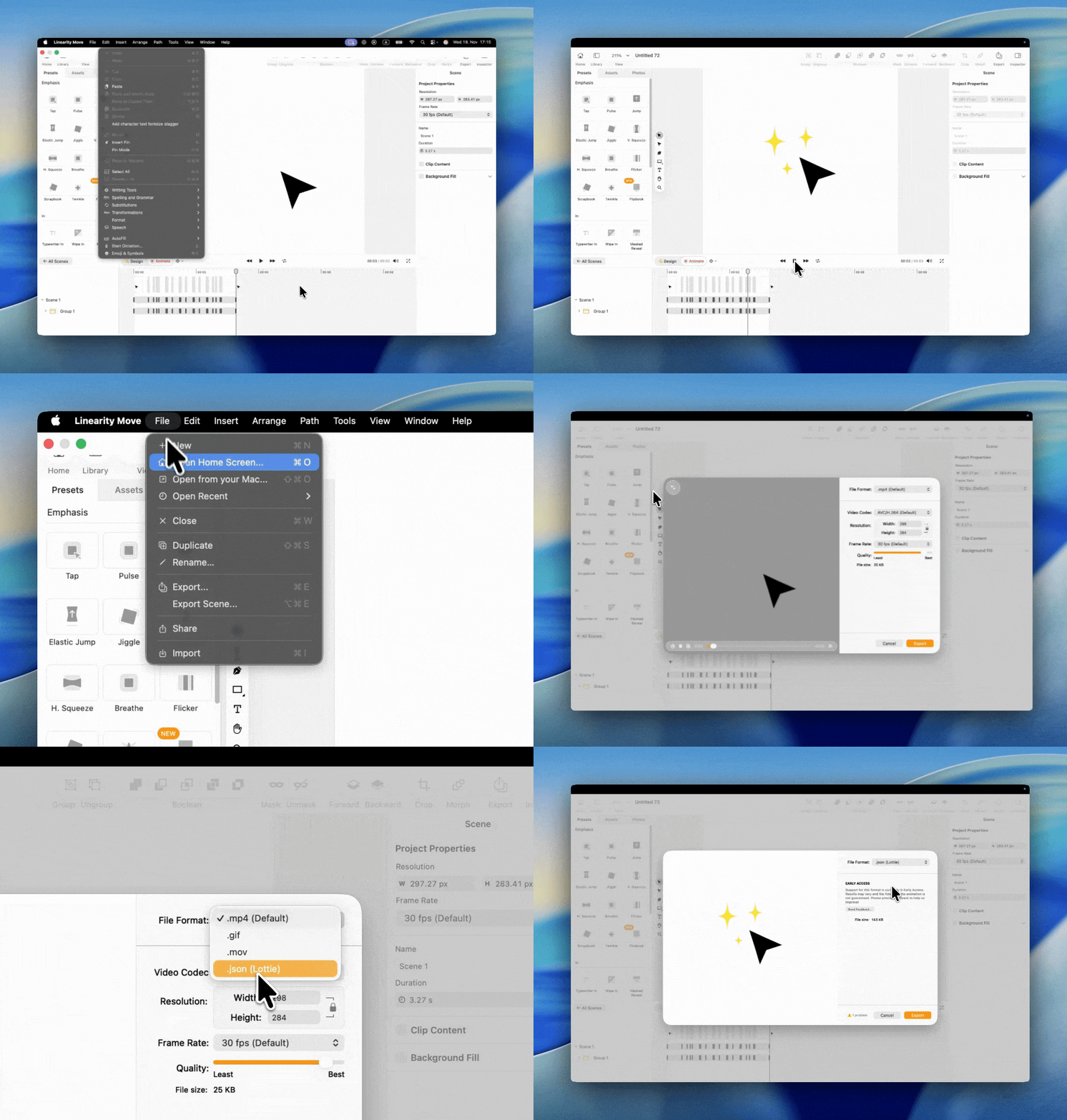
How to Export Lottie Files in Linearity Move
The process is simple and works just like exporting any other format:
- Finish your animation in Linearity Move
- Go to File → Export
- Select Lottie (.json) as the export option
- Click Export
You’ll get a clean, compact JSON file ready to use with standard Lottie libraries.
What’s Included in Lottie Export
Your exported animation is designed to match Move’s preview as closely as possible.
Here’s what you can expect:
- 1:1 accuracy with your animation: timings, easing, keyframes
- Vector-perfect quality: strokes, fills, gradients
- Layer hierarchies preserved
- Compatibility with popular Lottie players
A few limitations for now:
- Effects like blur or shadows won’t export (these aren’t supported natively by Lottie)
- Audio is not included
- Very complex paths may increase file size
We’d Love Your Feedback
This is just the beginning. Lottie export is brand new in Move — we’re excited to hear how it works for your projects, what you love, and what you’d like us to improve next.
Drop your thoughts and wishes anytime at feedback.linearity.io 🧡
Or reach out at support@linearity.io if something feels off.
Frequently Asked Questions
A Lottie file is a lightweight JSON-based animation format that keeps everything crisp, scalable, and fast. It’s perfect for apps, websites, and UI animations because it loads instantly and stays sharp on any screen.
Yep! Lottie files exported from Linearity Move work with all major Lottie players — including iOS, Android, and JavaScript. You can plug your JSON file into your app or website using the official Lottie libraries.
Lottie files load faster, look sharper on high-resolution screens, work well for interactive UI, are much smaller than MP4, MOV, or GIF, allow developers to control them with code.nSo if you need smooth, responsive animations, Lottie wins every time.
Nope. Your animation stays vector-based and crisp. Timing, motion, curves, keyframes, and paths are preserved one-to-one with what you created in Move.
You can always reopen your Linearity Move file and export a new Lottie version.nSome platforms also allow small tweaks to the JSON file, but it’s best to edit your source animation in Move for full control.
Most vector animations export perfectly, including timing, easing, transforms, masks, and morphs.nA few things don’t export yet (because Lottie itself doesn’t support them), such as shadows, blur effects, and audio.
:quality(75))
:quality(75))
:quality(75))

App of the Day
6.1K ratings
Get Started for free

Design in Curve.
Create sharp, scalable designs with intuitive tools for logos, illustrations, and professional branding.

Animate in Move.
Effortlessly create animations for social media, online ads, and motion graphics.
Trusted and used by leading brands


