Design tips
Instagram Post Size 2026: Feed, Story, Reel & Grid Sizes (Free Templates)
Every Instagram post size for 2026, including feed posts, Stories, Reels, carousels, profile photos, grid previews, safe zones, and templates.
The short answer: Instagram sizes in 2026
In 2026 Instagram image sizes vary depending on the format, but the most commonly recommended dimensions are 1080 × 1080 px for square posts, 1080 × 1350 px for vertical posts, 1080 × 566 px for landscape posts, and 1080 × 1920 px for Stories and Reels.
Vertical content continues to dominate Instagram's feed, with portrait formats such as 4:5 (1080 × 1350) and increasingly 3:4 (1080 × 1440) helping creators make the most of the screen on mobile devices.
| Format | Size | Aspect ratio |
|---|---|---|
| Feed post, square | 1080 × 1080 px | 1:1 |
| Feed post, vertical | 1080 × 1350 px | 4:5 |
| Feed post, vertical (extended, grid-matched) | 1080 × 1440 px | 3:4 |
| Feed post, landscape | 1080 × 566 px | 1.91:1 |
| Carousel | Same as the feed formats above; the first slide sets the ratio for all slides | n/a |
| Stories | 1080 × 1920 px | 9:16 |
| Reels | 1080 × 1920 px | 9:16 |
| Reels cover | 420 × 654 px recommended; the grid shows a 3:4 center crop, so keep key elements centered | 1:1.55 |
| Profile photo | 320 × 320 px (displayed as a circle) | 1:1 |
| Story Highlight cover | 1080 × 1920 px (center-cropped to a circle) | 9:16 |
To get all of these sizes from one design, use the AI social media post generator: select the artboard, pick another format and click Generate. The layout is re-fitted to the new format, not stretched.
What changed on Instagram
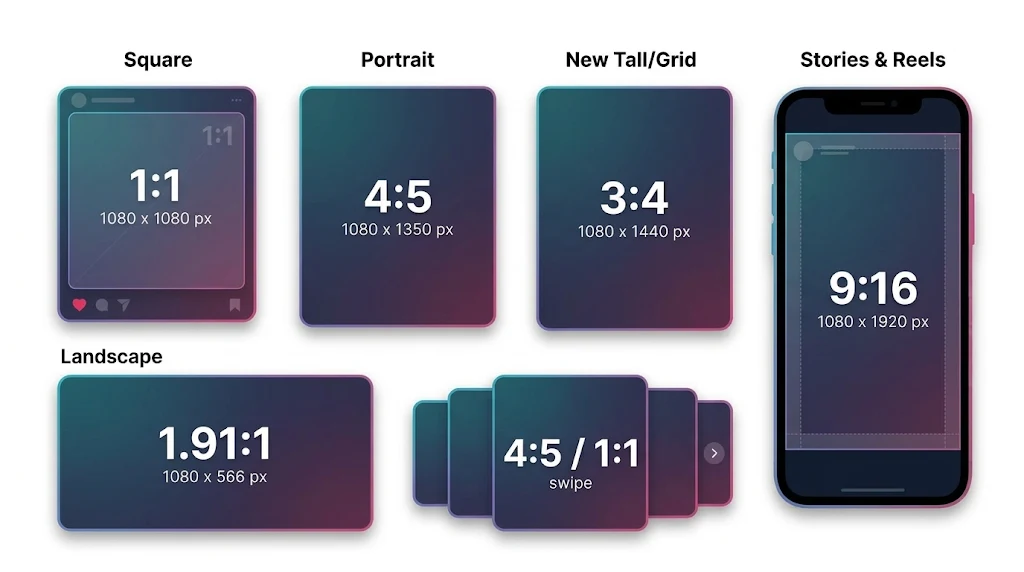
Instagram post formats and aspect ratios for 2026.
A few things moved in the past year, and they are why this guide was updated:
- Taller feed posts. Instagram's current photo guidance accepts uploads from 1.91:1 up to 3:4, so 1080 × 1440 is now a valid feed size next to the classic 4:5.
- The grid is no longer square. Instagram moved profile grid previews from 1:1 to 3:4 in early 2025. Every post, whatever its original shape, is now center-cropped to 3:4 in the grid.
- Reels crop in three places. Full screen (9:16), feed (4:5) and grid (3:4). Centered compositions survive all three.
Everything below has been updated for these changes.
Critical 2026 tips
Use safe zones and watch the overlays. Keep key text and logos centered, with padding on every side, so nothing is cut off in the feed, in the 3:4 grid or under Instagram's captions and buttons. Exact figures are in the safe zone section below.
Plan differently for ads. If you plan to promote a post with Meta Ads, sticking to 4:5 (1080 × 1350) is often safer because some ad placements crop taller images.
Instagram has no single image size: feed posts, carousels, Stories, Reels, Highlights and profile photos each have their own, and the platform is strict about them. If the image doesn't fit the spec, you're at the mercy of awkward crops. This guide gives the best size for each format, plus pro tips for quality. It focuses on images and leaves video editing aside.
Need a starting point? Generate a post from a prompt with the AI design generator, or start from a ready-made layout in the Templates Hub.
Instagram aspect ratios
Aspect ratio is written width first, then height (x:y). You'll see 9:16 a lot on Instagram: it's the shape of a standard smartphone screen, a portrait image that fills the whole screen. Instagram is the land of vertical viewing, so think vertical first.
File sizes and limits in 2026
- Photos are uploaded at up to 1080 px wide. A photo between 320 and 1080 px wide keeps its original resolution as long as its aspect ratio is between 1.91:1 and 3:4 (at 1080 px wide, that means a height between 566 and 1440 px).
- If the aspect ratio isn't supported, Instagram crops the photo to fit a supported ratio. Photos narrower than 320 px are enlarged to 320 px, and photos wider than 1080 px are sized down to 1080 px.
- Reels can use any aspect ratio between 1.91:1 and 9:16, with a minimum resolution of 720 px and a minimum frame rate of 30 fps.
- Video file size: 4 GB is Meta's documented limit. Scheduling tools that publish through Instagram's API have lower limits.
- For the best quality, upload images at 1080 px width whenever possible.
For image size specifications across every major platform (YouTube, LinkedIn, TikTok, Discord and more), the social media image sizes guide covers all platforms in one place.
Safe zone guidelines (2026)
To avoid UI overlap and cropping:
- Keep key content within the center 1080 × 1350 area for the feed.
- For Stories, keep key footage and text inside a 1080 × 1610 px safe area, which leaves roughly 155 px clear at the top and bottom.
- For Reels, keep text and logos away from the top and bottom, where the username, captions and buttons sit. Meta's Reels guidance leaves about 14% clear at the top, 35% at the bottom and 6% on each side.
Building a template with the safe zones already marked takes the guesswork out. Linearity's AI social media post generator keeps text inside the safe area when it lays out a post, and you can still move everything by hand.
Instagram post size

An Instagram feed design using a portrait-friendly layout.
Remember when you could only upload a square photo to Instagram? Thankfully, those days are gone. You can now upload square, portrait and landscape images without needing borders or special apps.
Ready to create brand assets that pack a punch? Visit our Academy for free advertising design courses. Get started
When it comes to carousel posts, you can also use square, portrait or landscape formats, but the first image determines the aspect ratio for the entire carousel. Carousel images work best at 1080 × 1350 px (4:5). You can still post square carousels, but the grid view stays 3:4.
Instagram post image size guide
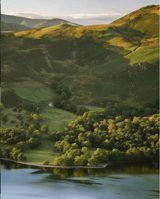
@explorewithhannah making good use of vertical image dimensions on Instagram.
Instagram is all about high-quality photos, so we recommend following the ideal dimensions below:
- Instagram square photo size: 1080 × 1080 px (1:1)
- Instagram vertical photo size: 1080 × 1350 px (4:5)
- Instagram extended vertical photo size: 1080 × 1440 px (3:4)
- Instagram landscape photo size: 1080 × 566 px (1.91:1)
- Instagram carousel post size: same as the formats above (1080 × 1350 px, 4:5, is the safest choice)
- Supported range: at 1080 px wide, any height between 566 px (1.91:1) and 1440 px (3:4)
Setup tip: use a 1080 × 1350 px artboard. To get the square or 3:4 version, select the artboard, choose the format and click Generate in the AI social media post generator.
Pro tips
- Avoid editing on Instagram. Instagram's editing tools are great, but your images turn out better quality and more consistent when you use professional editing software beforehand to resize and enhance them before uploading them to the Instagram app. If you'd rather not touch a pixel, an AI design generator can produce the post for you, and the result stays fully editable.
- For vertical images, crop to the 4:5 aspect ratio first, then export at 1080 × 1350 px to maintain the highest quality. If you want to use the extra height, crop to 3:4 and export at 1080 × 1440 px.
Instagram profile photo size

An Instagram profile image designed for a clear circular crop.
This one can be tricky because of its small size and circular shape; it's a dot in the main feed and not much bigger on your profile landing page, but a well-positioned headshot and good background can work well.
Recommended Instagram profile photo dimensions
The ideal photo size for your Instagram profile pic is still pretty small, so we recommend using the desktop size to ensure a high-quality photo on both mobile and desktop:
- Upload size: 320 × 320 px
- Displayed size (mobile): about 110 × 110 px
- Aspect ratio: 1:1 (square, displayed as a circle)
Pro tips
- For a personal profile, you want people to see your face, so choose an image of yourself from the shoulders up.
- A clean and simple background with a pop of color brings your profile icon to life. You can use design software like Linearity to change the background color of your profile pic.
- Business profiles: while many businesses use their logo for their profile pic, you could consider using a picture of your product for the profile icon, especially if the text in the logo can't be read on the main feed or search bar.
Instagram Stories size
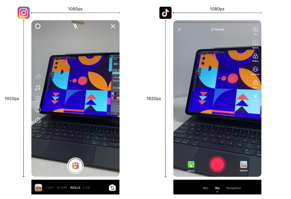
An Instagram Story layout designed for a 9:16 canvas.
The Instagram Story feature is your opportunity to take over the screen. These posts are the largest piece of real estate on Instagram, so it's important that you maximize the use of this sweet, sweet 9:16 screen space!
Because you're encouraged to add text and other assets to your Stories, Instagram allows you to resize images and videos to make space for added elements when you're uploading them.
The standard size for Story posts on Instagram is an aspect ratio of 9:16. You have a few options to work with regarding pixel dimensions. You could work with 720 pixels wide × 1280 pixels tall (standard 720p video format), 900 × 1600 pixels, or 1080 × 1920 pixels (HD 1080p video format), which all fall into the 9:16 aspect ratio, but remember you want maximum size for maximum quality.
Discover our template gallery! Edit and use hundreds of free templates for Instagram Stories. Visit the Templates Hub. Prefer to start from a prompt? Describe your Story to the AI social media post generator and edit the result.
Recommended Instagram Stories dimensions
- Size: 1080 × 1920 px
- Aspect ratio: 9:16
- Safe area: 1080 × 1610 px (keep important footage and text in the center)
- Instagram can technically accept smaller resolutions such as 720 × 1280, but higher resolution ensures better quality.
Design at this size. Create a 1080 × 1920 px Story with the AI social media post generator, with text already kept inside the safe area.
Story video limits in 2026
- Video length per segment: up to 60 seconds. Longer videos are automatically split into multiple Story frames.
Pro tips
- You can make static photos more engaging on Instagram Stories by turning Live Photos into Boomerangs. To do this, simply tap and hold down your Live Photo, and Instagram will automatically turn it into a Boomerang.
- Did you know that if you tap and hold any text colors in the given palette, it pops up with an entire gradient? So, you can make your text on Stories in ANY color you choose!
- You can create a collage of multiple images on one Story frame by selecting a blank background and then choosing the Sticker tool, which allows you to select multiple images from the camera roll on your phone. You can size these images however you want to.
Instagram Story Highlight icon size
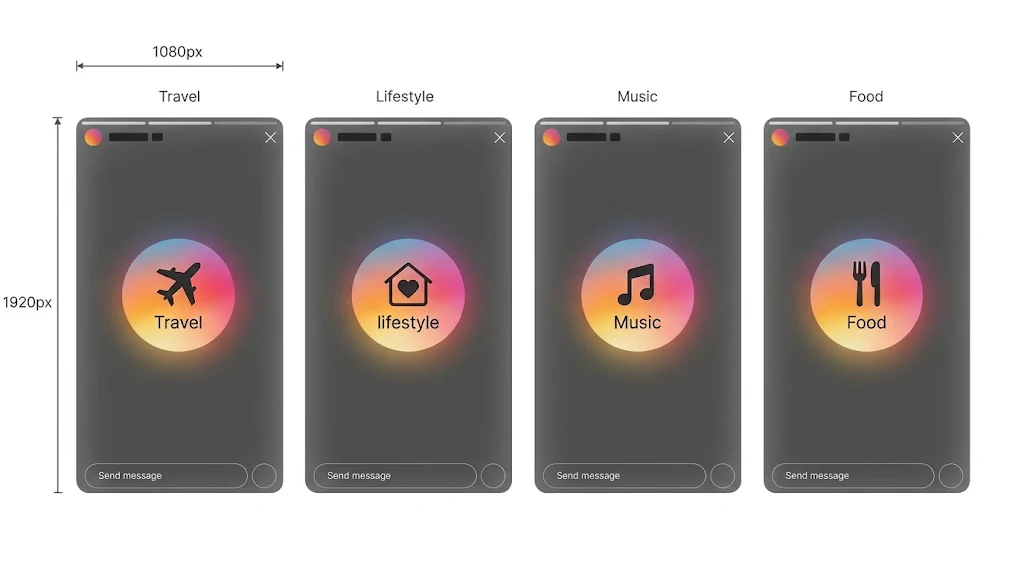
A set of Instagram Highlight cover designs.
Instagram Highlights is an excellent feature that enables you to save your Stories to your profile so the good ones don't disappear after 24 hours!
Story Highlight icons can look fantastic on your profile page and offer another opportunity to tell an engaging visual story about your life or business.
The round Highlight cover icon is tiny, so you must be innovative and keep it minimal. Never let size affect quality, though. There's no getting away with low-quality images on Instagram!
When initially designing, you can create the icon on a Story-sized canvas with the artwork in the center, which Instagram will then crop into a circle when you upload it.
Recommended Instagram Story Highlight cover dimensions
Instagram Story Highlight artwork centered for the circular profile crop.
- Upload size: 1080 × 1920 px (9:16), with the artwork centered
- Displayed as a small circle cropped from the center of the image
Pro tips
- Highlight icons are perfect for creating brand consistency or a cohesive aesthetic on your page. Using backgrounds with similar shades or textures, or simply a range of colors that match well, will look good on your profile page.
- Create the artwork in a design program like Linearity first, and then put a circular mask on top to guide you.
- Don't want to make Highlight icons yourself? You can buy them online! Online marketplaces like Etsy sell beautiful Highlight icon packs. Otherwise, support a graphic designer you know and pay a professional to make some for you.
Instagram Reels size

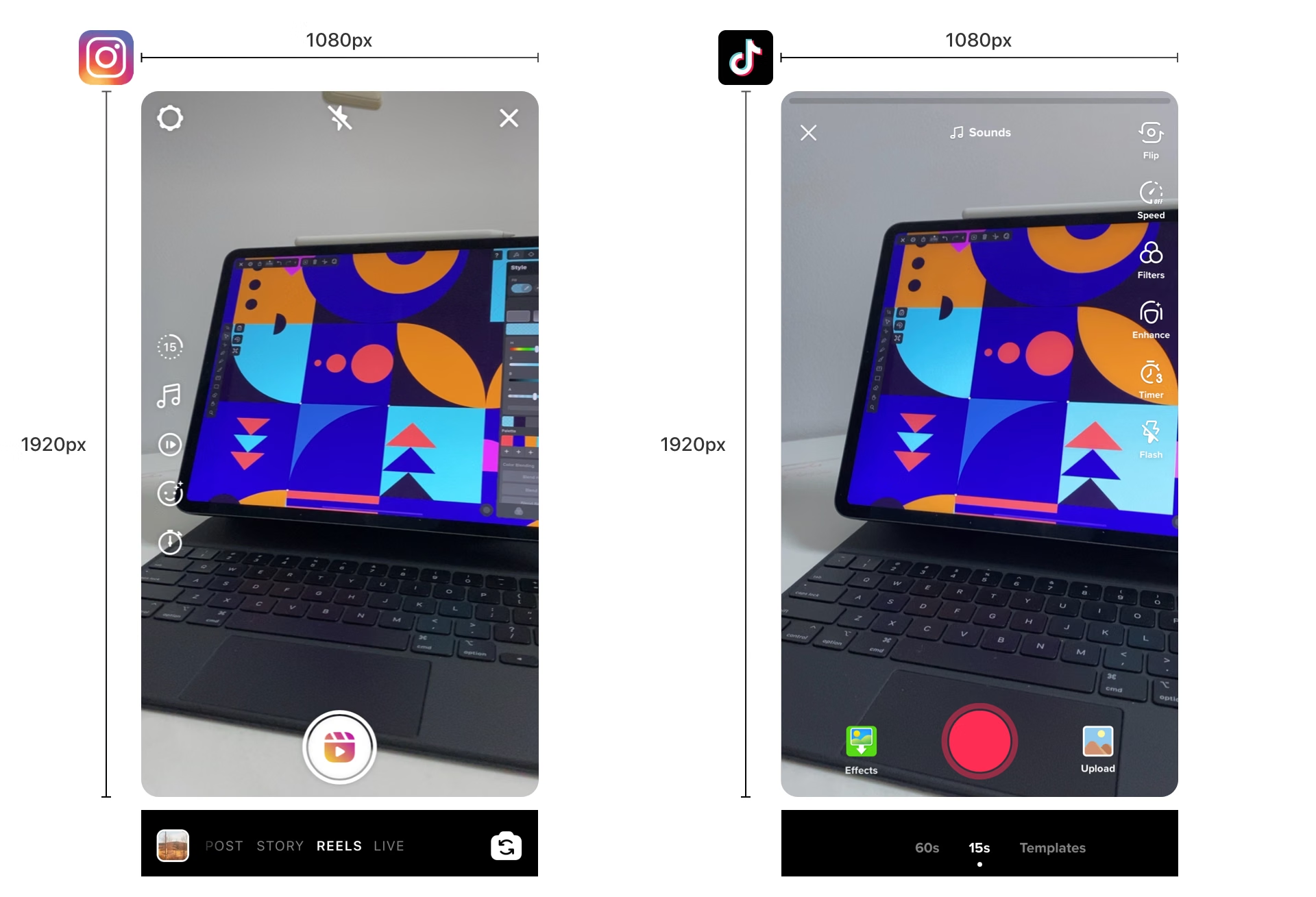
Reels are Instagram's short-form vertical video format. You can record them in the app, share them from other apps, or upload pre-recorded videos from your gallery.
Reels are short video clips. They're watched vertically full screen in the standard 9:16 aspect ratio, but when pushed to the main feed, they get cropped to a 4:5 aspect ratio.
Get these templates free. Edit high-quality, professionally designed Reel and Story templates directly in Linearity, with no separate files to download. Open the Reels templates, or start from a prompt with Linearity AI.
Recommended dimensions for Instagram Reels
Instagram Reels are now one of the platform's main discovery formats. They are short-form vertical videos designed for quick engagement and algorithmic distribution.
- Resolution: 1080 × 1920 px
- Aspect ratio: 9:16 recommended (Instagram accepts 1.91:1 to 9:16)
- Minimum resolution: 720 px; minimum frame rate: 30 fps
- Grid view: a 3:4 crop (1080 × 1440 px) from the center of the frame
- When Reels appear in the main feed, they may be cropped to 4:5, so keep important content centered.
Design at this size. Make a 1080 × 1920 px Reel cover or title card in the AI social media post generator and keep the title in the centered 3:4 area.
Reel limits in 2026
- Maximum Reel length: you can record one clip or several that add up to 20 minutes. Instagram notes that Reels over 3 minutes won't be recommended to new audiences, so keep a Reel to 3 minutes or less if you want to reach people who don't follow you yet.
- Scheduling tools that publish through Instagram's API are capped at 15 minutes.
- Video file size: 4 GB is Meta's documented limit. API uploads have lower limits.
- Reel cover: 420 × 654 px (1:1.55) is the recommended cover size, in PNG or JPG format.
Pro tips
- Use text. Most Reels are scrolled through with the sound off, so to create the best experience for viewers, add text and subtitles so that they can follow the video without sound.
- If you don't want a Reel posted to your main grid but want it to show up in the main timeline, toggle "Also Share to Feed" off when posting.
- Make sure the text you use is within the safe zone of 1080 × 1350 px for the feed cropping so nothing is awkwardly cut off when users see your Reel in the timeline.
Instagram grid preview behavior (2026)
Instagram announced the move from square grid thumbnails to a 3:4 (taller rectangle) format in January 2025, and it is the standard in 2026. What this means in practice:
- Every post is center-cropped to 3:4 in the grid, whatever its original shape. Even a 4:5 image loses a little from the sides.
- Vertical posts (4:5 and 3:4) lose the least. Square and landscape posts lose the most.
- Design with a centered composition that works in both the full feed format and the 3:4 grid thumbnail.
- For feed posts and carousels, the grid thumbnail is about 1012 × 1350 px (3:4), so only the center of a 1080 × 1350 image is visible.
- For Reels, the grid view is a 3:4 crop (1080 × 1440 px) of the 1080 × 1920 frame. Keep titles, faces and logos dead center to survive all three crop contexts: full screen (9:16), feed (4:5) and grid (3:4).
Resize an Instagram post without rebuilding it
One of the most common mistakes is designing one square graphic and then trying to reuse it everywhere. The same artwork rarely survives a trip from a 1:1 post to a 4:5 feed post to a 9:16 Story without something getting cut off.
Resizing moves pixels. A good Instagram set changes the layout with the frame. Stretch a 4:5 post into 9:16 and you get empty bands or a headline pushed into the area the Story interface covers. Here is what to change when you move one design between formats:
| Moving from 4:5 (1080 × 1350 px) to | New size | What to change |
|---|---|---|
| Square | 1080 × 1080 px | You lose 270 px of height. Keep the headline and logo in the middle and drop secondary elements. |
| 3:4 feed post | 1080 × 1440 px | You gain 90 px of height. Use it for breathing room or one supporting element. |
| Story | 1080 × 1920 px | You gain 570 px of height. Extend the background and move text inside the 1080 × 1610 px safe area. |
| Reel cover or title card | 1080 × 1920 px | Extend the background, keep the title out of the top 14% and bottom 35%, and keep it centered for the 3:4 grid crop. |
| Profile grid thumbnail | 3:4 center crop | Nothing to export. Check that the important parts survive the crop. |
A better workflow:
- Start with the format you'll use most (usually 4:5 or 3:4 for the feed).
- Keep the key message and logo inside the center safe area.
- Resize the same design for the other formats instead of starting over. In Linearity, select the artboard, choose the format you need and click Generate. You get the layout re-fitted to that format, and you can adjust it from there.
- Check each version against the safe zones above before exporting.
Full walkthrough: how to resize Instagram posts.
Export feed graphics at 1080 px wide. Use JPG for photos, and PNG for crisp edges or transparency.
Where AI fits into the workflow
Instagram's sizes change, but your brand needs to look the same in every one of them. That's where AI helps most:
- Starting a post. Describe what you want to say, and an AI design generator gives you a first layout in the right size, in your brand colors and fonts.
- Making variations. Generate the 4:5 feed post, the 3:4 grid-friendly version and the 9:16 Story from the same idea with the AI social media post generator.
- Keeping control. The output is editable, so you can change text, move elements and fix the safe zones yourself instead of re-prompting.
Use AI for the first draft and the resizing, and your own judgment for the details that make the post yours.
Getting started with an Instagram design template
While your 1080 × 1080 px square and 1080 × 1350 px vertical images are the most common on Instagram, it helps to have guidelines to refer to. Most importantly, you need the right tools to maximize the quality and impact of your images!
Many awesome graphic design software tools are available to help you design Instagram images in the right dimensions. Linearity has ready-to-use templates for all your Instagram assets, and an AI design generator for when you'd rather start from a prompt, to help you bring your visuals to life and make the design process more enjoyable.
Create Instagram content in every format
Get started
Frequently asked questions
What is the best Instagram post size in 2026?
For most feed posts, 1080 × 1350 px (4:5) is the safest default. 1080 × 1440 px (3:4) uses more of the screen and matches the grid, but if you plan to run the post as an ad, 4:5 is often safer because some placements crop taller images. Square 1080 × 1080 px and landscape 1080 × 566 px still work.
What size are Instagram Stories and Reels?
Both use 1080 × 1920 px (9:16). Keep text and logos away from the top and bottom, where Instagram's interface sits (Meta's Reels guidance leaves about 14% clear at the top and 35% at the bottom). Reels are also cropped to 4:5 in the feed and 3:4 in the grid, so keep the important parts centered.
Does the Instagram profile grid still crop to squares?
No. Instagram moved profile grid previews from 1:1 to 3:4 in early 2025. Every post is center-cropped to 3:4 in the grid, so vertical posts (4:5 and 3:4) lose the least.
Can one design be resized for every Instagram format?
Yes. Design the post once, then in Linearity select the artboard, choose the format you need (4:5 feed post, square, 9:16 Story) and click Generate. Repeat for each format, and check the safe zones on each version before you publish. Build it with a centered composition so it survives each crop. You can start from a prompt in the AI social media post generator, or see how to resize Instagram posts.
How long can an Instagram Reel be?
Up to 20 minutes, recorded as one clip or several clips that add up to 20 minutes. Instagram says Reels over 3 minutes won't be recommended to new audiences, so shorter Reels have a better chance of reaching people who don't follow you.
What is the maximum file size for an Instagram photo or video?
Meta documents a 4 GB limit for video, and scheduling tools that publish through Instagram's API have lower limits. Photos work at any aspect ratio from 1.91:1 to 3:4, and 1080 px wide is the best width.
App of the Day40K+ ratings
Get Started for free

Design in Curve.
Create sharp, scalable designs with intuitive tools for logos, illustrations, and professional branding.
Download Now
Animate in Move.
Effortlessly create animations for social media, online ads, and motion graphics.
Download NowTrusted and used by leading brands


