
The right AI design tool for a marketing team is the one that fits how the team makes work: who creates the designs, how many formats each campaign needs, and how strictly the brand must be followed. Canva suits teams that start from templates and want co-editing and social scheduling in one place. Linearity suits teams that want to describe a design in a prompt and get back an editable, on-brand design file with live text, separate layers and vector shapes.
This guide is written for marketing teams, where designers and non-designers share the same work. It covers how to judge a tool by the way it generates designs, what you can still change afterward and how it keeps a brand consistent across a campaign. It also explains where a conversational assistant such as Claude fits, and where a dedicated design tool is still needed.
If you want a product-by-product shortlist, read our review of the best AI design tools in 2026. If you are a designer looking at AI step by step, see the practical AI workflow for graphic designers.
How should a marketing team choose an AI design tool?
Plenty of videos and listicles promise to name the best graphic design platform for marketing teams. They are a useful starting point, but a ranking cannot know your team. A tool that is perfect for a solo social media manager can slow down a team of ten that runs campaigns in four languages.
A better approach is to describe the work first and then test each tool against it. These six questions cover most of what matters.
1. Who will make the designs?
In most marketing teams, designs come from two groups. Designers set the look, build key visuals and handle the hard cases. Marketers, product managers and sales colleagues need a social post, a webinar slide or an event poster by tomorrow, and they are not going to learn a professional design app to get it.
A good tool lets the second group produce usable work without breaking the rules the first group set. Ask whether a non-designer can get a correct first version on their own, and whether a designer can open that same file and refine it without rebuilding it.
2. How does the tool generate a design?
AI design tools start from different places, and that shapes everything after. Some start from a template library and use AI to fill or suggest layouts. Some start from an image model and return a picture. Others start from a prompt and build a layout with separate text, shapes and images.
None of these is wrong. Templates are fast when your work repeats a known format. Image models are good for exploring a mood. Prompt-to-layout tools help when you need a new design for a specific message and do not want to search a library for something close enough.
3. What can you still edit after generation?
This is the question that separates a demo from a production tool. Marketing copy changes late. Legal asks for a different disclaimer. The price in the headline goes up. If the design came back as a flat image, every one of those changes means generating again and hoping the rest stays the same.
Check whether text stays as live, editable text, whether the logo and shapes sit on their own layers, and whether graphics are vectors that scale cleanly. If you already have flat images, see whether the tool can split them into layers, as Linearity's image to layers tool does.
4. How does the brand kit reach every design?
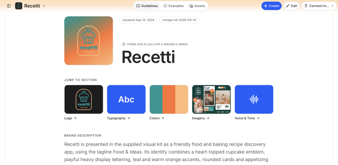
A shared brand kit gives every teammate the same logo, colors, fonts and tone of voice.
Most tools now offer some form of brand kit. The difference is how it is applied. In some, the brand kit is a panel you pick from while editing. In others, it is fed into generation, so the first draft already uses your colors, fonts and logo.
For a team, also ask who owns the brand kit and who can use it. If each person keeps their own copy, it drifts. Linearity builds a brand kit from your company website, including logo, colors, fonts and tone of voice, and applies it to every generated design. In a shared workspace, a brand set to Organization is available to everyone, so nobody pastes a hex code into a prompt. Our guide to on-brand AI design tools for marketing goes deeper on testing a brand kit.
5. How many formats and languages does one campaign need?
Count the real output of a typical launch: a square post, a vertical story, two ad sizes, a slide for the sales deck, perhaps the same set in three languages. That number tells you more about the right tool than any feature list.
If the number is high, look for tools that adapt one approved design rather than making each version from scratch. Linearity can resize a design for other formats and translate it into other languages while keeping it editable, so a local team can still fix a long line in German or a price in yen.
6. Where do review and approval happen?
Every marketing team has a sign-off step, even if it is one brand manager looking at a Slack thread. Decide where that review will live and check what each tool supports. Some offer real-time co-editing and comments on the canvas. Others share files in a project and leave review to the tools you already use.
In Linearity, a project holds a campaign's files and everyone you invite by email works on the same files, opening and editing them in turn. Two people cannot edit the same file at the same moment yet. For larger companies, an organization has admins and members, signs in through your identity provider and runs on one plan with shared AI credits.
If procurement or legal is part of approval, ask about data handling early. Linearity GmbH is a European company, is SOC 2 Type I and GDPR compliant, hosts data in the EU and does not use customer files, brand kits or prompts to train its models.
Where Linearity fits

Linearity turns a prompt into a layered design file in your brand.
Linearity is an AI design tool that turns a text prompt into an editable design in your brand. It makes social posts, ads, posters, slides, logos and App Store screenshots. The output is a design file with layers, live text and vector shapes, not a flat image. Logos, icons and illustrations come back as editable SVG paths.
It also handles the cleanup work that campaigns pile up: removing backgrounds, upscaling images and splitting a flat image into separate layers. It runs in any browser, and Linearity Curve and Linearity Move cover vector design and animation on Mac and iPad. Linearity does not generate AI video. Publishing directly to social networks is coming soon; until then, you schedule posts in the tool you use today.
Linearity vs Canva for a marketing team
Canva is widely used by marketing teams for good reasons. It has a very large template library, real-time co-editing with comments, AI features under its Magic Studio name, brand kits and built-in scheduling to social channels. If your team mostly adapts known formats and wants planning and publishing in one tool, Canva covers a lot.
Linearity starts from a different place. You describe the design you need, and it generates a layout in your brand rather than asking you to pick a template and replace its contents. The result stays editable down to the layer, and resizing and translation work on that same file. For a side-by-side view, see Linearity vs Canva.
Many teams will not choose one forever. The honest test is to give both tools the same brief from your next campaign and see which one gets you closer to a file you can approve.
Looking for a Canva or Kittl alternative?
People look for alternatives when a tool stops matching the work. Common reasons are that templates start to look like everyone else's, that the team wants AI to generate the layout instead of filling a template, or that one design has to become many formats and languages. Kittl, for example, is known for vector-based templates and text effects, which suits standout graphics more than high-volume campaign sets. Use the same six questions above to judge any alternative, and read our list of the best Canva alternatives in 2026 for specific options.
Is Claude good for graphic design, or do you need a design tool?
Conversational assistants such as Claude and ChatGPT are now part of most marketing workflows. The useful question is not whether they replace design software, but what each one is best at and where the handoff happens.
What a conversational assistant does well
- Turning scattered notes into a clear creative brief with audience, message, formats and constraints.
- Writing and shortening headline and caption variants for each channel.
- Critiquing a layout from a screenshot and pointing out weak hierarchy or unclear calls to action.
- Writing code, such as an HTML page or a simple SVG, when the output is meant for the web.
These are real contributions. A short, sharp brief from a chat makes every design tool after it work better.
What a dedicated design tool adds
A marketing team still needs a design it can open, change and hand off. That means live text you can retype, layers you can move, vector shapes you can recolor and export settings that match each channel. It also means a brand kit applied by the tool, not retyped into every prompt.
This is the role Linearity plays. It generates the design as a file, applies the brand kit, and lets you edit, resize and translate the result without generating it again. For a closer look at how it compares with Anthropic's own design features, see Linearity vs Claude.
Use both: Linearity inside Claude, ChatGPT and Slack
You do not have to pick between the chat and the design tool. Linearity runs in the browser at cloud.linearity.io and works inside Claude, ChatGPT, Cursor and Codex through its MCP server. A marketer can work out a brief in Claude, ask for the design in the same conversation and get back an editable, on-brand file.
It also works in Slack. Once Slack is connected to your organization, anyone can mention Linearity in a channel and get a layout, an image or a vector made with the shared brand. That keeps quick requests where the team already talks, while designers refine the files in the editor. Our guide to MCP for designers explains the setup.
How to test a tool with your team
A short trial with real work tells you more than any comparison. Linearity has a free plan, with paid Pro, Studio, Business and Enterprise plans on the pricing page. Whatever you test, run it like this:
- Pick one real brief. Use an upcoming campaign, not a made-up example, so the copy and formats are real.
- Set up the brand first. Load your logo, colors, fonts and tone of voice before anyone generates.
- Have a non-designer make the first version. See how close they get without help.
- Make three late changes. Change the headline, swap the image and add a disclaimer. Note what needed regenerating.
- Produce the full set. Create every format and language the campaign needs from the approved design.
- Run your normal approval. Check that reviewers can see the right files and that the final export matches each channel.
The tool that leaves the fewest manual fixes at step four and five is usually the right one for your team.
Frequently asked questions
Linearity vs Canva: which is better for a marketing team?
It depends on how the team works. Canva suits teams that start from templates and want real-time co-editing and social scheduling in one place. Linearity suits teams that want to describe a design in a prompt and get an editable design file in their own brand that they can resize and translate.
What is the best AI design tool for marketing teams?
There is no single best tool for every team. Choose by who makes the designs, how each tool generates a design, what stays editable afterward, how the brand kit is applied, and how many formats and languages a typical campaign needs.
Is there a Canva alternative that generates designs with AI instead of templates?
Yes. Linearity generates a design from a text prompt rather than from a template you fill in. The result is a design file with layers, live text and vector shapes, built with the colors, fonts and logo from your brand kit.
Is Claude good for graphic design, or do I need a design tool?
Claude is useful for briefs, copy, critique and code, but a marketing team usually still needs a design file it can edit, resize and hand off. Linearity works inside Claude through its MCP server, so you can ask for a design in the chat and get an editable, on-brand file back.
What is Linearity and what does it do?
Linearity is an AI design tool that turns a text prompt into an editable design in your brand: social posts, ads, posters, slides, logos and App Store screenshots. It runs in the browser and also makes Linearity Curve, a vector design app, and Linearity Move, an animation app.
About the blog author
Nadya Kunze runs Customer Support at Linearity and has more than seven years of experience helping customers in SaaS. Outside work, she enjoys drawing, hiking, and baking, and she writes about Linearity, graphic design, and creative technology.


